
The Annotations window is where stamps get designed: the text, the placeholders that fill it in, font, watermark and QR options, the position on the sheet and the sheets it lands on. This page walks the editor; for the business case, read Watermarks and annotations first.
In short
- Add annotation, type text with placeholders such as
(Revision)or(BOMQuantity), set font and size, tick Watermark or QR code, drag it into place, choose the Sheets. - Position X and Y are percentages of the sheet, so one stamp works on A4 and A0.
- The SOLIDWORKS drawing is never modified; the stamp is drawn on the PDF at export time.
The editor, top to bottom
- Toolbar: Add annotation, Remove, Import and Export (to share a stamp set), and Show placeholders, which swaps evaluated values for token names while you position.
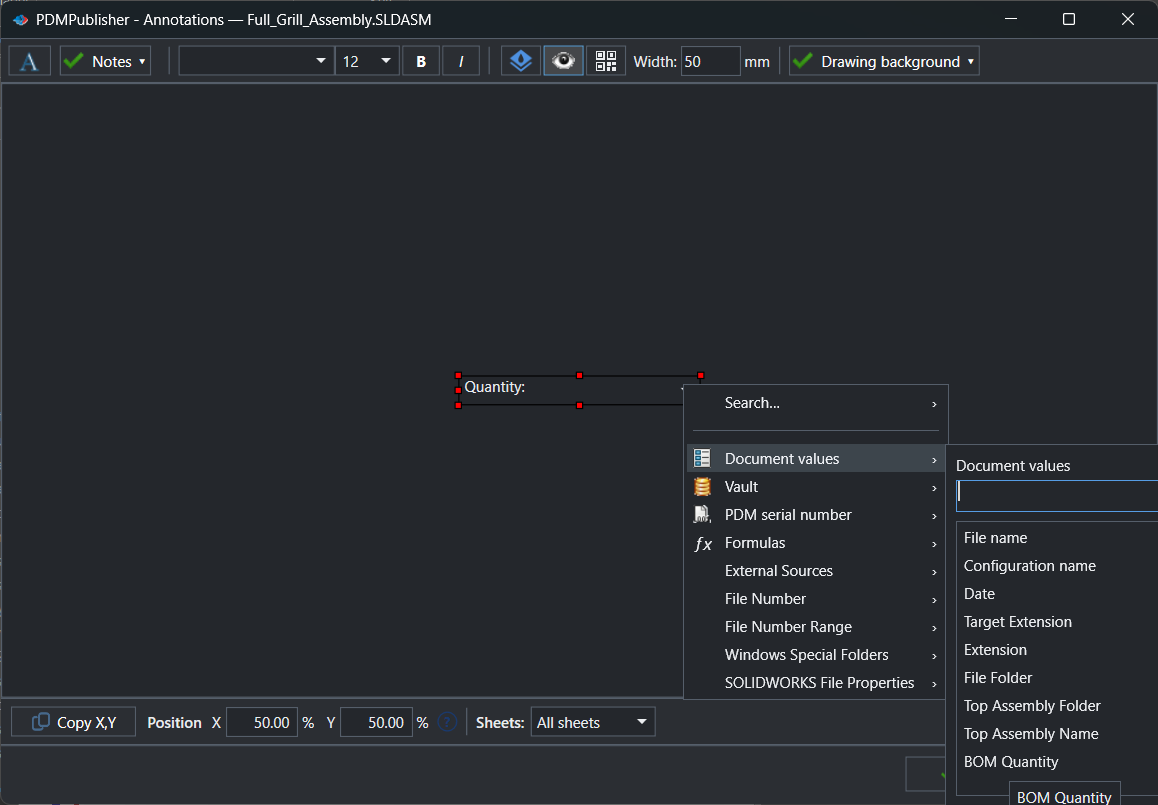
- Canvas and text box: type the text; the arrow menu inserts Document values, SOLIDWORKS file properties, Vault and PDM serial numbers, Formulas, External Sources and SQL queries.
- Formatting: font, size, bold, italic, the Watermark toggle for a rotated semi-transparent label, and QR code with a width in mm.
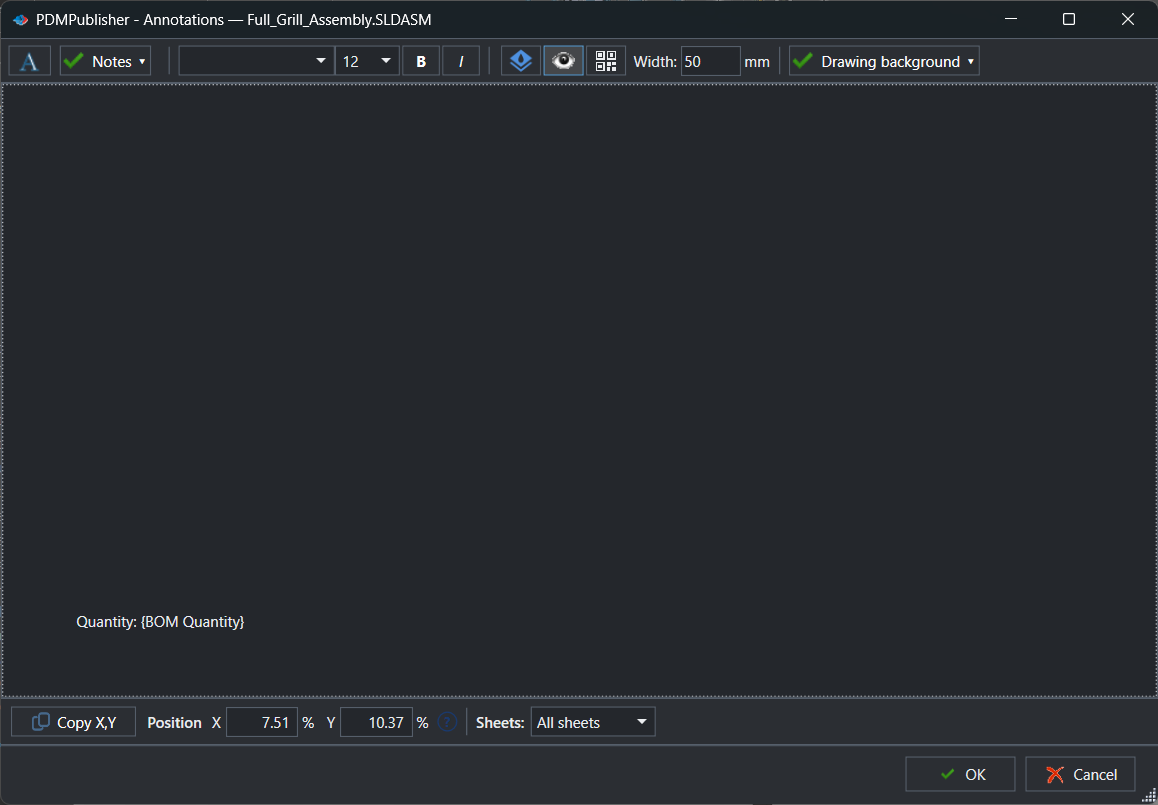
- Bottom row: Copy X,Y takes the position of a selected SOLIDWORKS note; Position X / Y in percent; Sheets decides which sheets get the stamp (all, first only, or a name pattern).
- OK saves the annotations into the current Publish profile (the task keeps them on its Annotations page).
Settings that matter
| Setting | What to put | Why |
|---|---|---|
| Text | Rev (Revision) - (State), Quantity: (BOMQuantity) | Values are resolved at publish time for each document. |
| Watermark | On | Diagonal PRELIMINARY across the sheet. |
| QR code | On, width in mm | Encodes the evaluated value, for example the part number. |
| Position X / Y | Percent of the sheet | The same stamp lands in the same place on every format. |
| Sheets | All, first only, or a pattern | Cover-only stamps and every-page stamps side by side. |
Recipes
| You want | Set | You get |
|---|---|---|
| A per-component quantity note | Quantity: (BOMQuantity), size 14, bold, X 90 / Y 95, all sheets | Every component page in a merged PDF shows its own count. |
| A configuration label | Config (ConfigurationName) of (TopAssemblyName), X 50 / Y 3, first sheet | Each configuration’s PDF is self-identifying. |
| Preliminary and released | Two profiles: a PRELIMINARY watermark, and a clean revision stamp | Pick the right one from the Publish arrow. |
If something looks wrong
- The box shows a token, not a value: that is Show placeholders mode. Values resolve at publish time; check the PDF or the Detailed log.
- A menu group is empty: Vault needs a local vault view selected on the PDM page; Formulas and External Sources list only what is defined under Settings.
- Nothing prints: confirm Show annotation is on, PDF is among the formats, and the Sheets rule matches.
- The stamp lands elsewhere on another format: position is a percentage; test on the largest and smallest sheet.
Availability
The Annotations editor is part of PDMPublisher for SOLIDWORKS, the add-in that runs inside SOLIDWORKS. It is available in the Community Edition. The PDM task has the same editor on its Annotations page.
Keep going
Documentation
Frequently asked questions
Where is the Annotations editor in PDMPublisher?
In SOLIDWORKS, on the PDMPublisher CommandManager tab select Annotations; the command arrow opens a specific Publish profile. In the PDM Professional task it is the Annotations page of the task in the PDM Administration tool.
What placeholders can I insert into an annotation?
The menu groups are Search, Document values (File name, Configuration name, Date, Target Extension, Extension, File Folder, Top Assembly Folder, Top Assembly Name, BOM Quantity), Vault, PDM serial number, Formulas, External Sources, File Number, File Number Range, Windows Special Folders and SOLIDWORKS File Properties.
What do Position X and Y mean in the Annotations editor?
Percentages of the sheet width and height. 50 / 50 is the sheet center. Drag the box or type values; Copy X,Y takes the position of a note selected in the SOLIDWORKS drawing.
Does the Annotations editor change my SOLIDWORKS drawing?
No. The canvas is a positioning preview. Annotations are drawn on the exported PDF at publish time; the source drawing is never modified.
How do I put an annotation on only some sheets?
Set the annotation’s Sheets rule to First sheet, or to These sheets and list the sheet names separated by comma. Each annotation has its own rule.
Can I copy annotations from one profile to another?
Yes. Use Export… to save the collection as an .edmtdf file, select the other profile and use Import…. Import replaces that profile’s current annotations.