
A 200-page merged drawing package without navigation is a scrolling exercise. PDF bookmarks fix that: PDMPublisher writes a bookmark into the master PDF for every document it merges, named from a pattern you define with placeholders such as (FileNameWithoutExtension), (Revision) or a PDM variable like ($Description). The reader opens the bookmark panel in Acrobat or any PDF viewer and jumps straight to the drawing they need. The same setting exists in PDMPublisher for SOLIDWORKS and in the PDM Professional task.
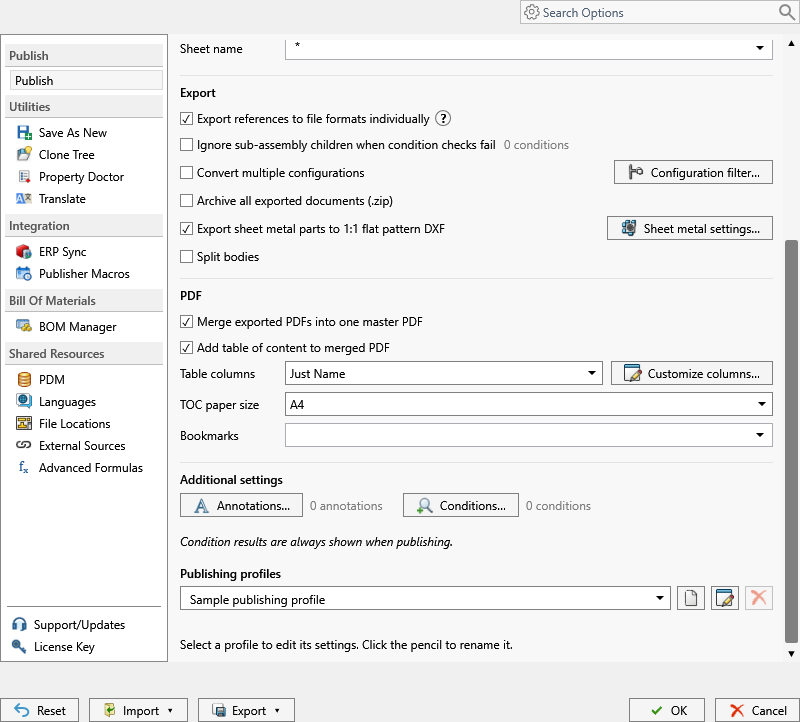
What PDF bookmarks do
When PDMPublisher publishes an assembly with Export references to file formats individually and Merge exported PDFs into one master PDF, it exports each reference’s drawing to an individual PDF and then combines those PDFs, in processing order, into a single master PDF. The Bookmarks setting defines the bookmark pattern used in that merged PDF. For each merged document, PDMPublisher evaluates the pattern against the file being processed and writes the result as a bookmark that points at that document’s first page.
The pattern is not a fixed label. It is built from the same placeholder system that drives Export location and Filename, so a bookmark can read 11345 - Rev B - Speaker frame for one part and 11346 - Rev A - Cone for the next, with no manual editing. The >... menu next to the field lists the placeholders that are valid in that context.
Bookmarks complement the generated table of contents. The contents page is a printed index at the front of the package; bookmarks are the clickable sidebar that works on screen. Most release packages benefit from both, and the docs recommend enabling both when the merged PDF needs navigation.
Why it matters
Merged PDFs exist because people downstream want one file: a supplier quoting a weldment, a customer receiving an installation package, a quality inspector auditing a released revision. The problem with one file is that a 40-part assembly becomes 60 to 150 pages, and the only way to find sheet 3 of the bracket drawing is to scroll or search for text that may not exist on a scanned or vector page.
Bookmarks solve that without extra tooling on the receiving side. Every mainstream PDF viewer shows the bookmark panel, and each entry carries the name you chose, typically part number, revision and description. A purchasing agent can click through the package in BOM order. A machinist can jump to the flat pattern drawing. A reviewer can confirm that every item in the parts list has a corresponding drawing, because the bookmark tree mirrors the merge order.
Because PDMPublisher generates the bookmarks from live file data at publish time, they cannot drift from the package contents the way hand-edited bookmarks do. When the job runs on a PDM workflow transition, every release regenerates the master PDF and its bookmarks together.
- Supplier RFQ packages with bookmarks named by part number and description so quoting does not require opening every page.
- Release records where the bookmark carries
(Revision)and(State)to make the released state visible inside the PDF. - Customer documentation where the bookmark text uses a PDM description variable rather than an internal filename.
- Configuration-specific packages where
(ConfigurationName)distinguishes outputs of the same part.
How it works, step by step
- The job starts on an assembly: in the add-in, the assembly is open in SOLIDWORKS and you select PDMPublisher > Publish; in the task, the task is launched on the assembly from a workflow transition, the right-click menu or a scheduled item.
- With Export references to file formats individually enabled, PDMPublisher resolves the assembly references. The add-in reads the resolved references of the open assembly directly. The task calculates them from the selected BOM Template and Calculation method, or from the drawing’s first named BOM when Use drawing-derived BOM is enabled.
- Conditions are evaluated. Only references that pass are added to the processing queue, so only they receive an individual PDF and a bookmark.
- For each reference with
PDFselected in File formats, PDMPublisher looks for a drawing with the same name in the same folder (the task can also use Use PDM search to locate drawings) and exports it to an individual PDF, honoring Sheets to export, Sheet name and any annotations. - With Merge exported PDFs into one master PDF enabled, the individual PDFs are combined in processing order.
- For every merged document, PDMPublisher evaluates the Bookmarks pattern on the processing machine and writes a bookmark with the resulting text. Empty placeholders contribute an empty string.
- If Add table of content to merged PDF is enabled, the generated contents page is added as well, using the Table columns mode.
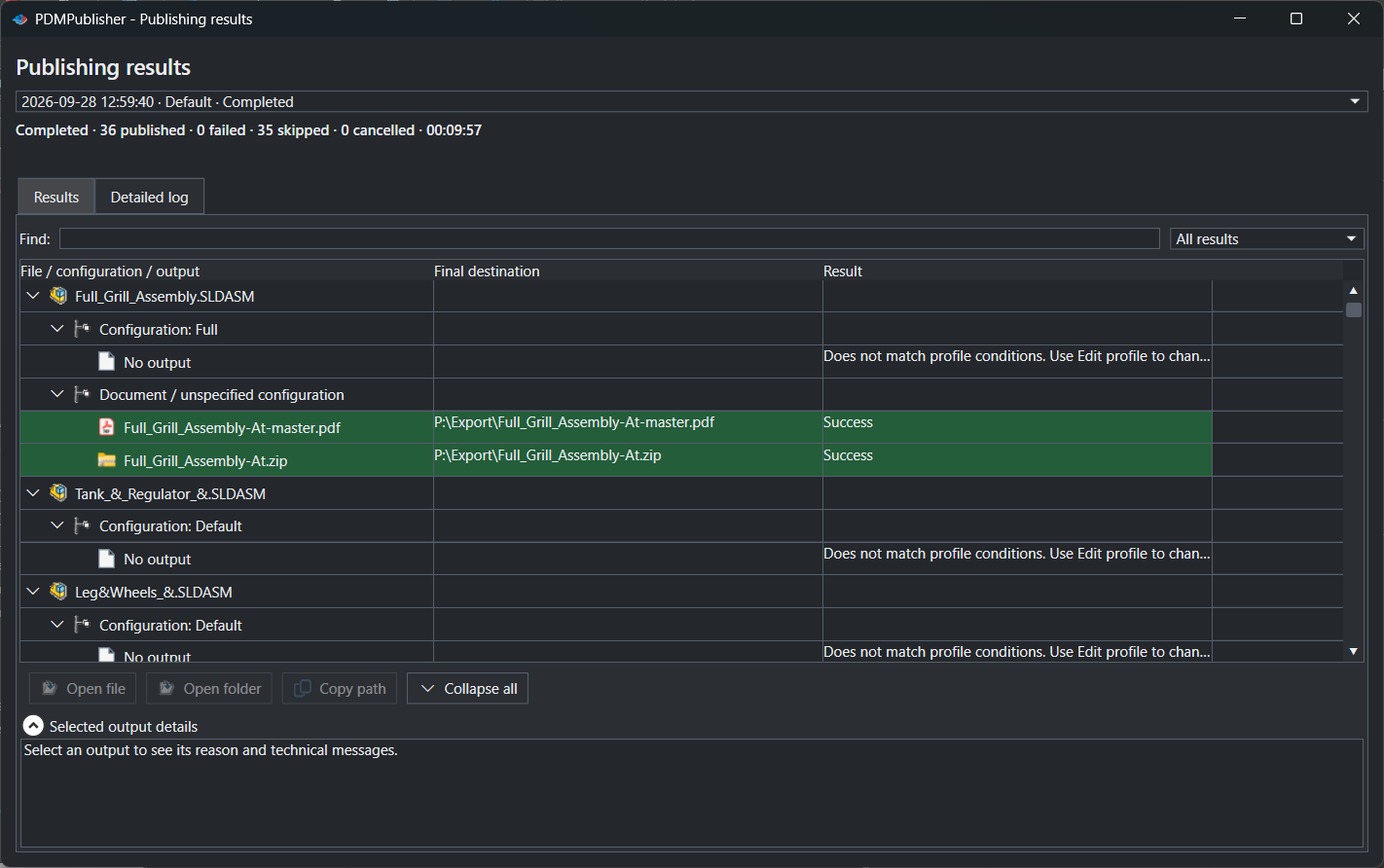
- The master PDF is saved to the Export location. The result is listed in Publishing results (add-in) or the vault activity log (task).
Bookmarks are written into the merged PDF only. Separate, unmerged PDFs and PDFs produced from a single part or drawing do not receive a bookmark tree from this setting.
Every setting that affects PDF bookmarks
The bookmark pattern is one field, but it only produces output when the merge pipeline around it is configured. The table lists every control involved, using the labels shown in the add-in’s PDMPublisher > Settings > Publish page and on the task’s Options page.
| Setting | What it does | Notes / default |
|---|---|---|
| Bookmarks (PDF bookmarks) | Defines the bookmark pattern used in the merged PDF. Type literal text and insert placeholders from the >... menu. | Empty by default. Placeholders offered depend on whether the file is processed from PDM or from the active SOLIDWORKS document. |
| File formats | Selects the output formats. PDF must be selected for drawings to be exported and merged. | Multiple formats can be selected in one job; only PDF output is merged and bookmarked. |
| Export references to file formats individually | Publishes the assembly’s references as separate output files. Required, because the individual PDFs are what gets merged. | Task: requires a BOM Template with name, configuration and quantity columns. Add-in: reads the open assembly’s resolved references. |
| Merge exported PDFs into one master PDF | Combines the exported PDFs into a single master PDF in processing order. This is the file that receives the bookmarks. | Assembly processing only. Does nothing on a part or drawing published alone. |
| Add table of content to merged PDF | Adds a generated contents page to the master PDF. Optional companion to bookmarks. | Enables Table columns and Customize columns…. |
| Table columns | Chooses the columns of the generated table of contents: Just Name, Name & Quantity or Custom Columns. | Only relevant when the table of contents is enabled. |
| TOC paper size | Paper size for the generated table of contents page, selected from a list of standard sizes such as A4 and LEGAL. | Shown in the add-in’s PDF section next to the Bookmarks field. Default A4. |
| Sheets to export / Sheet name | Choose all sheets or only sheets matching a pattern. Decides how many pages each merged document contributes. | Bookmarks point at the first page of each merged document. |
| Conditions… | Filters the references. References that fail are not exported, merged or bookmarked. | See Conditional assembly processing. |
| Ignore sub-assembly children when condition checks fail | Stops traversal below a subassembly that fails its conditions, removing its children from the merge. | Off by default. |
| Export location / Filename | Where the master PDF is written and how it is named. | Both accept the same placeholders as the bookmark pattern. |
Placeholders for bookmark text
The Bookmarks field accepts the same placeholder syntax as every other dynamic field in PDMPublisher. Placeholders are evaluated on the machine that processes the job and replaced with the current value for the file being merged. The list below covers the built-in placeholders most useful in a bookmark; the full set, including the numeric range and file number placeholders, is in the placeholder reference linked at the end of the article.
PDM variable placeholders use the form ($VariableName) and are listed in the PDM Variables submenu. Select them from the menu rather than typing them so the name and the $ prefix are correct. In the add-in, PDM values are available when a local vault view is configured under PDMPublisher > Settings > PDM.
| Placeholder | Meaning | Example |
|---|---|---|
(FileNameWithoutExtension) | Source filename without its extension. | Bracket |
(FileName) | Source filename with period characters removed. | BracketSLDPRT |
(ConfigurationName) | SOLIDWORKS configuration being exported. The PDM @ configuration is written as At. | Default, Machined |
(Revision) | Current PDM revision. Empty if the file has no revision. | B |
(Version) | Current PDM file version number. | 12 |
(State) | Current PDM workflow state of the source file. | Released |
(TopAssemblyName) | Filename of the top-level file that launched the job, without extension. | Speaker |
(BOMQuantity) | Quantity calculated for the file from the selected BOM template and reference data. | 4 |
(Date) | Current date on the processing host, short-date format with / replaced by -. | 8-13-2026 |
(Extension) | Source file extension without the period. | slddrw |
($VariableName) | Value of a PDM data card variable for the configuration being processed. | ($Description) → Speaker frame |
Worked examples. Pattern
(FileNameWithoutExtension) - Rev (Revision)produces11345 - Rev B. Pattern($Document Number) ($Description) x(BOMQuantity)produces11345 Speaker frame x4. Pattern(FileNameWithoutExtension) [(ConfigurationName)]producesBracket [Machined]and keeps bookmarks distinct when Convert multiple configurations is on. If a value such as Revision is empty, the placeholder contributes nothing, so place separators carefully to avoid a trailing dash.
Set it up in the SOLIDWORKS add-in
- In SOLIDWORKS, open the assembly to publish. Save it and make sure its references are resolved; unresolved or lightweight components cannot be processed reliably.
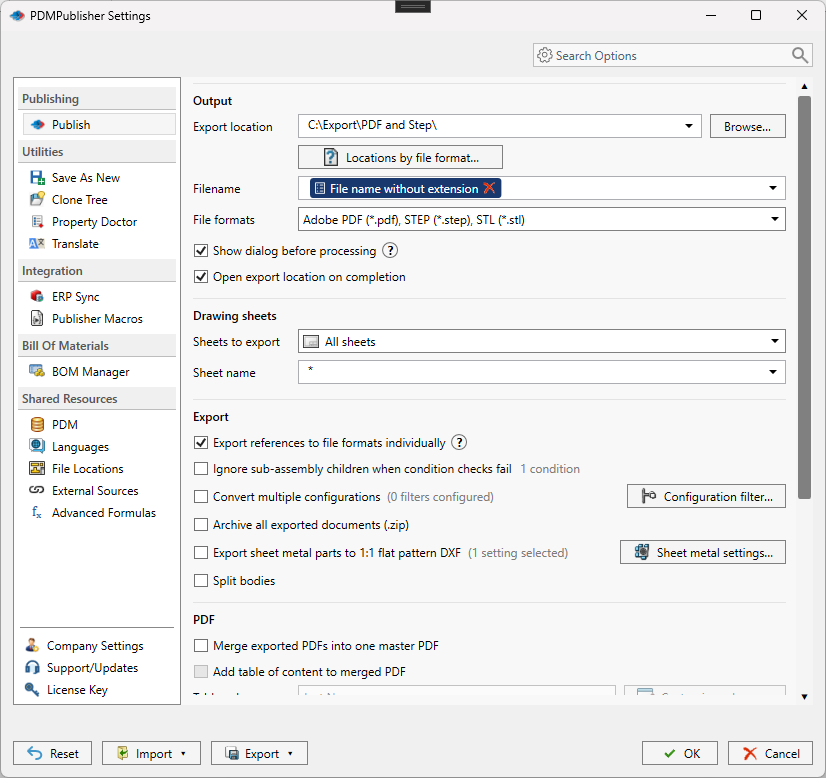
- Open PDMPublisher > Settings from the CommandManager tab and select the Publish page. Choose or create the Publish profile you want to edit under Publishing profiles.
- In File formats, select
Adobe PDF (*.pdf). Set Export location and Filename. - In the Export section, enable Export references to file formats individually.
- Scroll to the PDF section. Enable Merge exported PDFs into one master PDF. Optionally enable Add table of content to merged PDF and choose Table columns and TOC paper size.
- In Bookmarks, type the bookmark pattern. Use the
>...menu to insert placeholders such as(FileNameWithoutExtension),(Revision)or a PDM variable. - If you want to filter which references are merged, open Conditions… under Additional settings.
- Select OK to save the profile. Then select PDMPublisher > Publish, or use the arrow beside Publish to run a named profile directly. With Show dialog before processing enabled, review the resolved settings and the references that passed before the export starts.
- After the job, open Publishing results to check the master PDF and use Open file to verify the bookmark panel.
Set it up in the PDM Professional task
- Open the SOLIDWORKS PDM Administration tool, expand your vault, right-click Tasks and select New Task…, or open an existing PDMPublisher task.
- On the Add-in page select PDMPublisher, then set the Execution Method to the task host computers allowed to run the job.
- On the PDMPublisher Options page, set Export Location and Filename, select
pdfin File Formats, and confirm Use this version of SOLIDWORKS points to a version installed on the task host. - Select a BOM Template that contains the name, configuration and quantity (
RefCount) columns. This is required before enabling reference export in the task. - Enable Export references to file formats individually.
- Enable Merge exported PDFs into one master PDF. Optionally enable Add table of content to merged PDF and set Table columns.
- In PDF bookmarks, enter the bookmark pattern using the
>...menu for built-in placeholders and the PDM Variables submenu for data card values. - Optionally enable Vault Activity Logs and set a Log Folder (Vault Only) so the merge and bookmark steps are recorded.
- Click OK. Attach the task to a workflow transition, run it from the right-click Tasks menu on the assembly, or schedule it through a scheduled item.
Recipes
Three patterns that cover most release packages. Each assumes PDF selected, reference export on and PDF merging on.
- Supplier RFQ package. Bookmarks:
($Document Number) - ($Description). Table columns:Name & Quantity. Result: a bookmark per part named with number and description, and a contents page with quantities so purchasing does not need a separate BOM. - Released revision record. Bookmarks:
(FileNameWithoutExtension) Rev (Revision) (State). Export location:(VaultRootFolder)\Released PDFs\(TopAssemblyName). Run from the workflow transition into Released so every release regenerates the package and its bookmarks. - Configuration-specific package. Enable Convert multiple configurations with a configuration filter. Bookmarks:
(FileNameWithoutExtension) [(ConfigurationName)]. Filename:(FileNameWithoutExtension)-(ConfigurationName). The configuration name keeps both the bookmarks and the individual PDFs unique.
Tips, limits and troubleshooting
- No bookmarks in the output. Confirm the job ran on an assembly and that Export references to file formats individually and Merge exported PDFs into one master PDF are both enabled. Bookmarks are only written into the merged master PDF.
- Bookmark text is empty or truncated. An empty PDM variable or Revision evaluates to an empty string. Check the data card for the configuration being processed; when the drawing’s value is empty, PDMPublisher may read the variable from the matching part or assembly. Use Use @ Tab to Evaluate Paths in the task when values live on the
@tab. - Some references are missing from the package. Conditions filter references, and the add-in’s review dialog lets an operator clear files for the current run. In the add-in, all references need local copies; do a Get Latest on the assembly and its references first. In the task, verify that the BOM Template includes the required columns and that suppressed, virtual or excluded components are expected to be omitted.
- Font warning in the merged PDF. The message about the
Helvetica-Boldfont comes from the PDF reader. Install the appropriate font on the viewing computer. - Cannot see the exported master PDF. Make sure the export location is a folder where the task user has workflow and folder permissions to add files. The vault root folder is often locked by administrators.
- Community Edition limit. The free add-in processes up to 5 references per run and exports PDF, DXF and STEP only. Premium and the PDM task have no reference limit.
- Reviewing what happened. In the add-in, open PDMPublisher > Logs, filter by Errors or Warnings, and use Save… to attach the log to a support request. In the task, enable Vault Activity Logs; the Task Details tab lists files checked into the vault and Open Log File shows the full record.
- Cancelled jobs. Cancelling does not roll back files already exported. Inspect the destination before rerunning.
Availability
Available in PDMPublisher for SOLIDWORKS (the add-in) and PDMPublisher for PDM Professional (the task). PDF bookmarks are a shared setting of the SOLIDWORKS add-in and the PDM Professional task. They are written into the master PDF created by Merge exported PDFs into one master PDF, so they depend on assembly reference export. The placeholder menu offers different values depending on whether the file is processed from PDM or from the active SOLIDWORKS document.
Documentation and related features
- Run a Publish Job in the SOLIDWORKS add-in
- PDF Bookmarks option
- Merge multiple drawings into one PDF
- PDF table of contents
- SOLIDWORKS assembly documents
- SOLIDWORKS drawing documents
- Conditional assembly processing
- Watermark your PDFs
- Run as a SOLIDWORKS PDM task
Frequently asked questions
How do I add bookmarks to a merged PDF of SOLIDWORKS drawings?
Publish the assembly with PDF selected in File formats, Export references to file formats individually enabled, Merge exported PDFs into one master PDF enabled, and a pattern typed in the Bookmarks field, for example (FileNameWithoutExtension) – Rev (Revision).
Can the bookmark show the part description from the PDM data card?
Yes. Insert a PDM variable placeholder such as ($Description) from the PDM Variables submenu. In the add-in this requires a configured vault under Settings > PDM; in the task the values come from the vault directly.
Why does my merged PDF have no bookmarks?
Bookmarks are only written into the master PDF created by merging. The job must run on an assembly with reference export and PDF merging enabled. A single part or drawing does not produce a merged PDF.
Do bookmarks work together with the table of contents?
Yes. Enable Add table of content to merged PDF alongside the Bookmarks pattern. The contents page is a printed index and the bookmarks provide clickable navigation in the viewer.
What happens when a placeholder in the bookmark is empty?
It contributes an empty string. A missing Revision produces a bookmark without a revision, so keep separators minimal to avoid dangling dashes.
Are PDF bookmarks available in the free Community Edition?
Yes. Merging, bookmarks, conditions and annotations are available, but the Community Edition processes up to 5 references per run. Premium and the PDM Professional task remove that limit.