
Converting SLDASM to 3MF hands an additive workflow a richer package than STL: one file with the whole assembly, its components, colors and units, which modern slicers open directly. PDMPublisher writes 3MF of the assembly and, with references on, of every part in it from one job, or from a SOLIDWORKS PDM Professional task.
What you get
3MF (3mf) is the 3D Manufacturing Format backed by the 3MF Consortium, designed to replace STL for printing. Where STL is bare facets, 3MF carries units and structure, so print software imports it without guessing the scale.
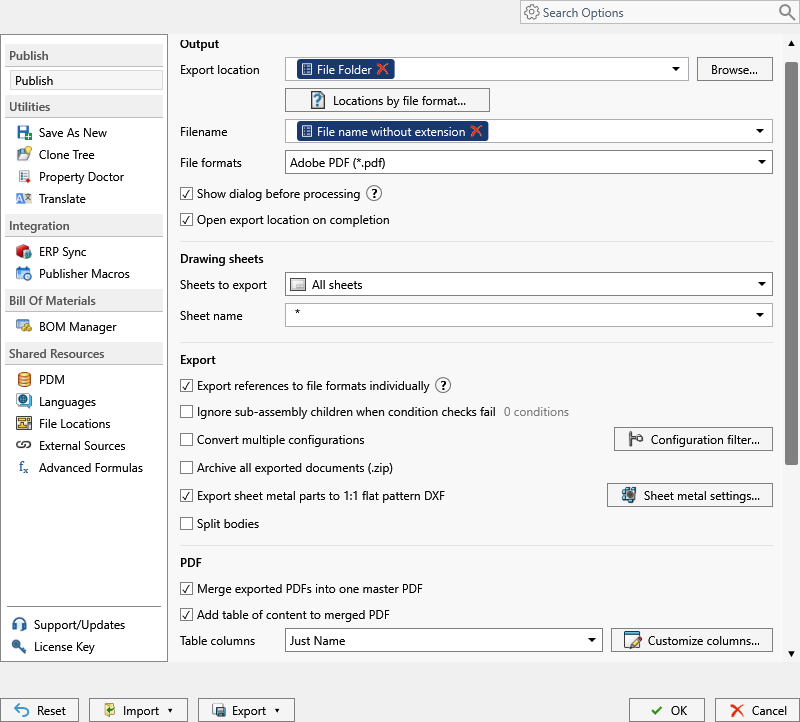
You get one .3mf of the assembly. Export references to file formats individually adds one per part and sub-assembly; Convert multiple configurations adds one per configuration. 3MF sits beside STL in the CAD and interchange group, so both meshes come out of one run. SOLIDWORKS’ current 3MF export options apply.
The manual way, and why it doesn’t scale
Open the top-level assembly, File > Save As, pick 3MF (*.3mf), name it, save. That’s the active configuration only. Repeat for every part you want as its own file, and again for every configuration.
Fine for one machine. For a 200-component release redone at every revision, it’s a day of clicking and a folder that never matches the BOM. Then the slicer team asks for the parts as separate files, and the loop starts again.
Convert SLDASM to 3MF with the add-in
- Open the top-level assembly in SOLIDWORKS, references resolved (Get Latest first).
- On the PDMPublisher tab, select Settings, then Publish.
- Set Export location: a fixed or UNC folder, or placeholders from the
>...menu. - Set the Filename pattern, such as
(FileNameWithoutExtension)-(Revision); the extension is added for you. - Under File formats, tick 3MF (
3mf); other ticked formats come out in the same pass. - Leave Export references to file formats individually off for one file of the whole assembly, or tick it for a
.3mfper part and sub-assembly too. No BOM template needed here. - Tick Convert multiple configurations with
(ConfigurationName)in the filename. The Configuration Filter includes (PROD*) or excludes (*Flat*) by wildcard. - Tick STL too if some printers still need it; both meshes come from the same job.
- Select
PDMPublisher > Publish, confirm the review dialog, and check Publishing results afterwards.
In PDMPublisher for SOLIDWORKS, 3MF needs Premium. The free Community Edition does PDF, DXF and STEP only, up to 5 references per run.
Automate it as a PDM task
PDMPublisher for PDM Professional runs the same engine as a task, so the assembly becomes 3MF on a state change.
- In PDM Administration, right-click Tasks, select New Task, choose PDMPublisher and name it.
- On the Options page, set Export Location (
(VaultRootFolder)\Exports\3MF, no trailing backslash) and Filename; PDM variables such as($PartNumber)work here. - Under File Formats, tick 3MF. Keep Export affected document on so the assembly itself is exported.
- For the components too, set Template to a PDM BOM layout (name, configuration and quantity columns) and enable Export references to file formats individually.
- Enable Convert multiple configurations and the Configuration Filter as in the add-in.
- Pick Use this version of SOLIDWORKS. For release workflows, enable Get latest revision only; it exports the version tied to the newest revision.
- Attach the task to a workflow transition, leave it in the right-click menu, or run it from Scheduled Items.
Settings that matter for 3MF
| Setting | What it does | Tip |
|---|---|---|
| Export location | Output folder: vault, relative, UNC or outside. Created if missing. | (TopAssemblyFolder)\Exports\(Revision) works; no trailing backslash. |
| Filename | Static text, placeholders, custom properties or PDM variables. | (ConfigurationName) for configurations, (Revision) for released files. |
| File formats | Tick 3MF (3mf); invalid formats are dropped. | Several formats per job. |
| Export references to file formats individually | One file per part and sub-assembly, beside the top-level export. | Task: needs a BOM Template. |
| Template (task) | PDM BOM layout that calculates references, configurations and quantities. | Must include <Name>, <Configuration> and <RefCount>. |
| Convert multiple configurations | Every assembly configuration, not just the active one. | Needs a configuration-specific filename. |
Naming and folders
Placeholders resolve when the job starts, so every file is named the same way:
(FileNameWithoutExtension)-(Revision):Drone-Frame-B.3mfin(TopAssemblyFolder)\Exports\3MF.(FileNameWithoutExtension)-(ConfigurationName)with Convert multiple configurations: one 3MF per assembly configuration.\\server\additive\($ProjectNumber)in the task: 3MF files routed to the print farm share by PDM project number.
Customize Location (Premium in the add-in, standard in the task) gives
3mfits own folder. A common setup sends3mfandstlto the print server whilestepstays in the vault.
Tips and troubleshooting
- 3MF needs a Premium key, entered under
PDMPublisher > License Key. The PDM task is licensed per vault, 7-day trial, every format included. - Invalid formats for the source type are dropped; some depend on the SOLIDWORKS version where the job runs.
- Missing references? The job needs local copies of every reference. Get Latest first.
- Task missing or wrong references? Check the BOM Template columns. Suppressed, virtual, envelope and excluded-from-BOM components are ignored.
- Exclude
*Flat*in the Configuration Filter so flat patterns don’t produce extra model files.
Availability
Available in PDMPublisher for SOLIDWORKS (the add-in) and PDMPublisher for PDM Professional (the task).
Documentation and related features
- Run a Publish Job (PDMPublisher for SOLIDWORKS)
- File Formats option
- SOLIDWORKS assembly documents
- SOLIDWORKS part documents
- Extension-specific export locations
- Run as a SOLIDWORKS PDM task
- Convert SLDPRT to 3MF
- Convert SLDASM to STL
- Convert SLDASM to STEP
Frequently asked questions
How do I export a SOLIDWORKS assembly to 3MF?
Tick 3MF under File formats, set location and filename, and Publish with the assembly open. Export references to file formats individually adds a 3MF per part.
Can I export 3MF and STL of an assembly at the same time?
Yes. Every ticked format comes out in one pass.
Where are the 3MF export options set?
In SOLIDWORKS export options on the computer running the job. PDMPublisher has no 3MF sub-options.
Is 3MF available in the free Community Edition?
No. Community Edition does PDF, DXF and STEP only. 3MF needs Premium in the add-in; the PDM task includes all formats.