
Customers, site contractors and 2D departments that live in AutoCAD want the drawing as DWG, not a screenshot. PDMPublisher writes the DWG beside the PDF from one job, named by revision, and a PDM Professional task does the same when the drawing is released.
Quick answer
- Open the drawing, tick DWG (dwg) under File formats on the PDMPublisher tab, set a filename such as
(FileNameWithoutExtension)-(Revision), select Publish. - Tick Adobe PDF in the same list and the AutoCAD side gets a read-only copy beside the DWG.
- DWG needs Premium in the add-in (the free Community Edition does PDF, DXF and STEP). The PDM task includes every format.
In SOLIDWORKS: step by step
- Open the drawing (in a vault, Get Latest first so references resolve).
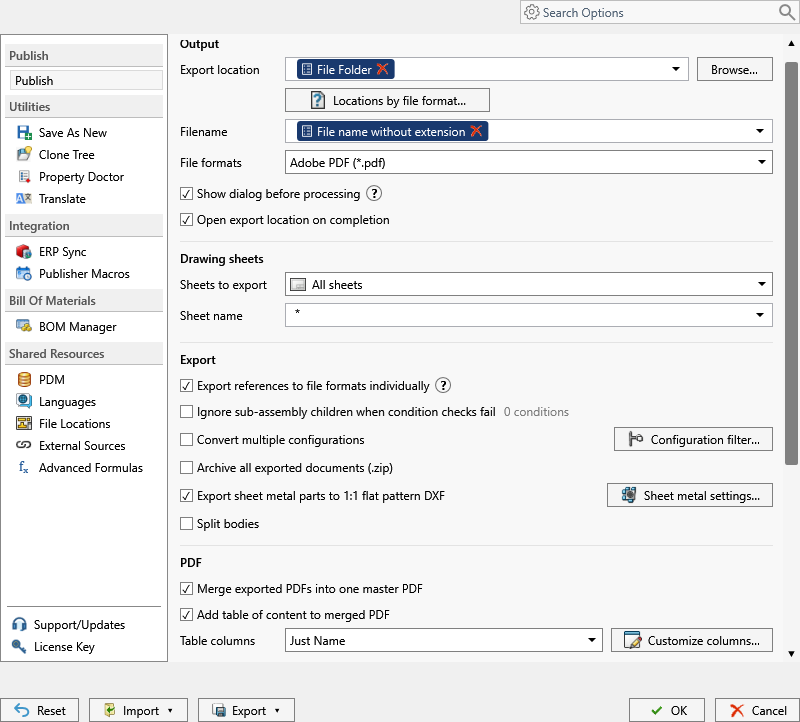
- On the PDMPublisher tab, select Settings > Publish.
- Set Export location and Filename, for example
(FileNameWithoutExtension)-(Revision). The.dwgextension is added for you. - Under File formats, tick DWG (dwg). Tick Adobe PDF too if the recipient wants both.
- Under Sheets to export, keep All sheets or choose Sheets matching name with
Sheet*to leave internal sheets out. - Select PDMPublisher > Publish, confirm the review dialog, and check Publishing results.
As a PDM task: on every release
PDMPublisher for PDM Professional runs the same engine as a task, so the export happens when the file changes state, not when somebody remembers.
- In PDM Administration, right-click Tasks > New Task, choose PDMPublisher, name it and tick the task hosts.
- On the Options page set Export Location, for example
(VaultRootFolder)\Exports\DWG(no trailing backslash), and the Filename. - Tick DWG (dwg) under File Formats and set Sheets to export as in the add-in.
- For release workflows, enable Get latest revision only.
- Attach the task to a workflow transition, or leave it in the right-click menu and Scheduled Items.
Settings that matter
| Setting | What to put | Why |
|---|---|---|
| Filename | (FileNameWithoutExtension)-(Revision) or, in the task, ($PartNumber)_Rev($Revision) | Bracket-B.dwg cannot be confused with Bracket-C.dwg. |
| Sheets to export | All sheets, or Sheets matching name with Sheet* | Internal and manufacturing-only sheets stay out. A pattern that matches nothing falls back to every sheet and logs it. |
| Export location | (VaultRootFolder)\Exports\DWG, no trailing backslash | Created if missing; you need add and edit permission there. |
Naming examples
(FileNameWithoutExtension)-(Revision)givesBracket-B.dwg.($PartNumber)_Rev($Revision)in the task names DWGs by PDM part number.- Customize Location (Premium in the add-in, standard in the task) sends DWG to the AutoCAD share while the PDF from the same job stays in the vault.
If something looks wrong
- DWG is greyed out or missing from the results: the add-in is running as Community Edition. Activate a Premium key under PDMPublisher > License Key, or use the PDM task.
- Every sheet came out despite a pattern: the pattern matched nothing. Check the spelling and the evaluated
(ConfigurationName)in the Logs tab. - Layers or line styles look different: PDMPublisher has no DWG sub-options. SOLIDWORKS export settings under Tools > Options > Export apply where the job runs.
- Nothing in the folder: you need add and edit permission in the export location. Target a subfolder, not the vault root.
Keep going
Documentation
Frequently asked questions
How do I convert a SOLIDWORKS drawing to DWG in batch?
Tick DWG (dwg) under File formats, set the export location and filename, and Publish. For a batch, run a PDM Professional task on the selected drawings, on a workflow transition, or from Scheduled Items.
Can I get DWG and PDF of the same drawing at once?
Yes. Tick both under File formats; every ticked format is written in the same pass, each to its own folder with Customize Location.
Where do I set the DWG version and mapping options?
In SOLIDWORKS export options on the computer running the job. PDMPublisher has no DWG sub-options.
Is DWG included in the free Community Edition?
No. Community Edition of the add-in does PDF, DXF and STEP only. DWG needs Premium; the PDM task includes all formats.