
One PDF with the assembly drawing first, then every part and sub-assembly drawing in BOM order, with a contents page and a bookmark per drawing: the document a reviewer actually wants. PDMPublisher builds it in one run, in SOLIDWORKS or as a PDM Professional task at release.
Quick answer
- Open the assembly, tick Adobe PDF (pdf), Export references to file formats individually and Merge exported PDFs into one master PDF, select Publish.
- Add table of content to merged PDF and a PDF Bookmarks pattern such as
(FileNameWithoutExtension) - (Revision)make it navigable. - PDF is free in the Community Edition but a real assembly set needs Premium or the PDM task (5-reference limit).
In SOLIDWORKS: step by step
Watch it once, then follow the steps: every drawing in the assembly, one master PDF.
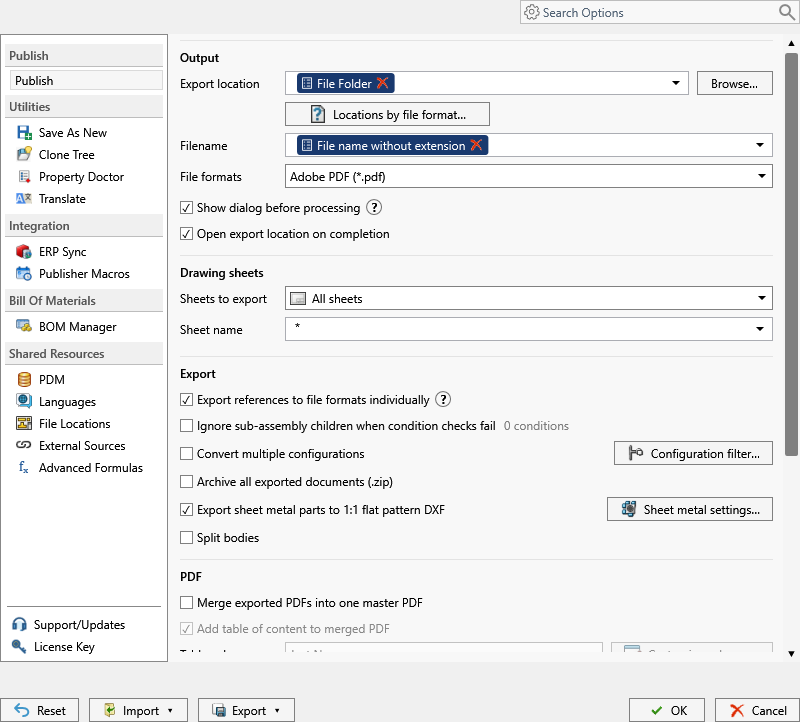
- Open the top-level assembly with every reference resolved. Each component’s drawing must sit beside it with the same filename.
- On the PDMPublisher tab, select Settings > Publish; set Export location, for example
(TopAssemblyFolder)\Review\(Revision), and Filename. - Under File formats, tick Adobe PDF (pdf), then tick Export references to file formats individually.
- Tick Merge exported PDFs into one master PDF. Optionally tick Add table of content to merged PDF, choose Table Columns and set the PDF Bookmarks pattern.
- On the Conditions page, keep purchased parts out with a rule such as Source not equal Purchased.
- Select PDMPublisher > Publish, confirm the review dialog, and open the master PDF.
As a PDM task: on every release
PDMPublisher for PDM Professional runs the same engine as a task, so the export happens when the file changes state, not when somebody remembers.
- In PDM Administration, right-click Tasks > New Task, choose PDMPublisher, name it and tick the task hosts.
- On the Options page set Export Location and Filename, tick Adobe PDF, keep Export affected document on.
- Set Template to a PDM BOM layout and enable Export references to file formats individually. Use drawing-derived BOM orders the pages by the assembly drawing’s BOM.
- Enable Merge exported PDFs into one master PDF, the table of contents and the bookmarks pattern. Enable Use PDM search to locate drawings.
- For release workflows, enable Get latest revision only, then attach the task to the release transition.
Settings that matter
| Setting | What to put | Why |
|---|---|---|
| Export references individually | On | The merge needs one PDF per drawing first. |
| Table Columns | Name & Quantity | The contents page doubles as a parts list. |
| PDF Bookmarks | (FileNameWithoutExtension) - (Revision) | Jump to any drawing from the reader sidebar. |
| Order | Use drawing-derived BOM (task) | Pages follow the assembly drawing’s BOM. |
Naming examples
- The master PDF takes the assembly filename:
Conveyor-B.pdf. - Bookmarks read
Bracket - A,Frame - Bper drawing. (VaultRootFolder)\Released Packages\($ProjectNumber)in the task files one package per project.
If something looks wrong
- No master PDF: check the three requirements, PDF ticked, references on, an assembly as the source. The merge does not run on a single part or drawing.
- A drawing is missing: its component has no same-name drawing beside it. In the task, enable Use PDM search to locate drawings.
- The reader complains about a missing font: that is the reader, not the file.
- Community Edition stopped at 5 references: the assembly is bigger than the free limit.
Keep going
Documentation
Frequently asked questions
How do I merge all the drawings of a SOLIDWORKS assembly into one PDF?
Tick Adobe PDF, enable Export references to file formats individually and Merge exported PDFs into one master PDF, then Publish with the assembly open.
Can the merged PDF have a table of contents and bookmarks?
Yes. Enable Add table of content to merged PDF, choose the Table Columns (name, name and quantity, or custom) and set a PDF Bookmarks pattern.
Why is Merge exported PDFs not doing anything on my part?
The merge is for assemblies only. It needs an assembly as the source and Export references to file formats individually on, so there are individual PDFs to merge.
Can a PDM task create the merged PDF automatically at release?
Yes. Create a PDMPublisher task with PDF, a BOM Template, Export references to file formats individually and Merge exported PDFs enabled, attached to the release transition.