
Converting Word and Excel files to PDF with a SOLIDWORKS PDM task closes a gap in the release. The spec, the test report and the packing list sit in the vault next to the drawings, and they should become PDF on the same transition. PDMPublisher for PDM Professional converts them with the same task, export location and filename pattern as the SOLIDWORKS files.
What you get
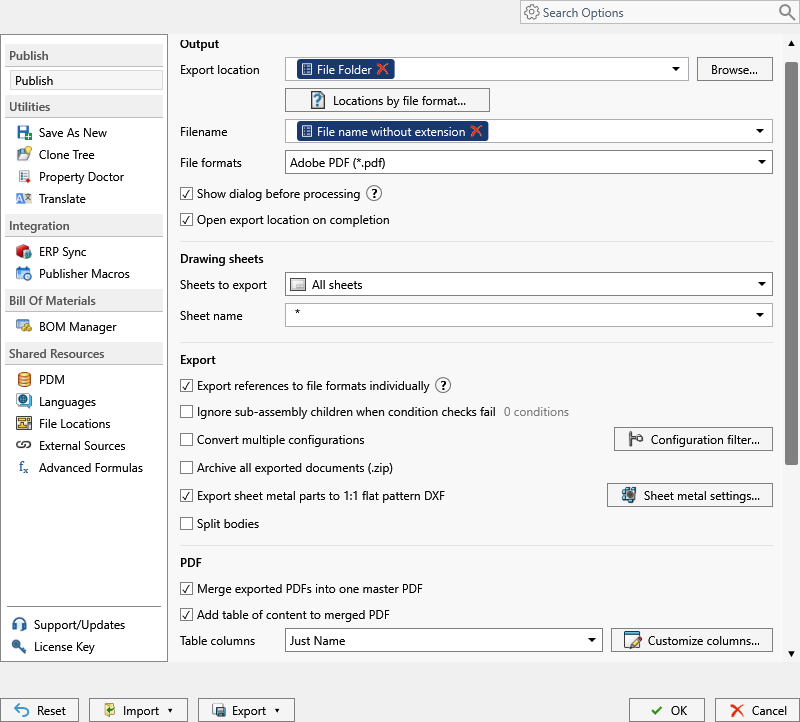
One .pdf per Office document, named by the task’s Filename pattern, filed by its Export Location, in the vault or outside it. The pdf format under File Formats exports SOLIDWORKS drawings and converts Word and Excel documents the task processes.
This is a PDM task feature only. The add-in exports the document open in SOLIDWORKS and its references, so it never sees a DOCX or XLSX. For Office sources, every format other than PDF is dropped.
The manual way, and why it doesn’t scale
Check out the document, open Word or Excel, File > Save As or Export to PDF, name it, check both files in. Repeat after every edit.
The PDF in the vault is whatever was last saved by hand, and a release package of drawings and documents ends up with two naming conventions.
Convert with the PDMPublisher add-in
Not applicable. The add-in publishes the document open in SOLIDWORKS; Office documents go through the PDM task below. If your workflow mixes drawings and documents, the task handles both in one run.
The task is licensed per vault with a 7-day trial and includes every format. The add-in’s Community and Premium editions don’t apply here.
Convert Word and Excel files to PDF with a PDM task
- In PDM Administration, right-click Tasks, select New Task, choose PDMPublisher and name it. Tick the task hosts under Execution Method.
- On the Options page, set Export Location, such as
(VaultRootFolder)\Released PDFs\($ProjectNumber)(no trailing backslash), and Filename, such as(FileNameWithoutExtension)-(Revision). PDM variables from the data card work here. - Under File Formats, tick Adobe PDF (
pdf). Keep Export affected document on so the document that launched the task is converted. - Enable Map Variables Between Source and Destination File to carry the source’s variables onto the PDF’s data card. Enable Create Reference from Destination File to Source File to link the PDF to its source.
- Pick Use this version of SOLIDWORKS (a year on the task host, or Latest). For release workflows, enable Get latest revision only so the version tied to the newest revision is exported.
- Attach the task to the release transition of the document workflow, leave it in the right-click Tasks menu, or list documents on Scheduled Items for a scheduled batch.
- While validating, enable Vault Activity Logs with Log Folder (Vault Only) at
(VaultRootFolder)\Logs\PDMPublisher; Task Details then lists every file checked in.
Settings that matter for Office documents
| Setting | What it does | Tip |
|---|---|---|
| Export location | Output folder: vault, relative, UNC or outside. Created if missing. | (TopAssemblyFolder)\Exports\(Revision); no trailing backslash. |
| Filename | Static text, placeholders, custom properties or PDM variables. | (Revision) for released files; keep names unique. |
| File Formats | Adobe PDF (pdf) converts Word and Excel documents processed by the task. | Other formats are dropped for Office sources. |
| Export affected document | Converts the document that launched the task. | Keep on. |
| Map Variables Between Source and Destination File | Copies mapped PDM metadata from the source to the PDF. | Part number, description, revision on the PDF’s card. |
| Create Reference from Destination File to Source File | Creates a PDM reference from the PDF back to its source. | Keeps Contains and Where Used meaningful. |
Naming and folders
The same placeholders name the document PDFs and the drawing PDFs, so a release folder stays consistent:
(FileNameWithoutExtension)-(Revision):Test-Report-1001-B.pdfin(VaultRootFolder)\Released PDFs\($ProjectNumber).($DocumentNumber)_($Description): PDFs named from the data card instead of the Word filename.(VaultRootFolder)\Released PDFs\(State)\(FileNameNumberRange): numeric document numbers grouped by state and thousand.
Customize Location gives the
Tips and troubleshooting
- Nothing exported for a DOCX? Only
pdfapplies to Office documents; every other ticked format is dropped. That’s expected. - Can’t see the exported files? You need add and edit permission in the export location. The vault root is usually locked; target a subfolder like
(VaultRootFolder)\Exports. - An exported file that already exists in the vault becomes a new version, with a check-in comment identifying PDMPublisher.
- Mixing documents and drawings in one transition works. The task converts each file by its type, so one Release to PDF task serves both workflows.
- Task stops with an error at launch? No files were selected and no Scheduled Items are set up.
Availability
Available in PDMPublisher for PDM Professional, the task add-in configured in the PDM Administration tool. Office-to-PDF conversion is a PDM task feature; PDMPublisher for SOLIDWORKS publishes the SOLIDWORKS document open in SOLIDWORKS.
Documentation and related features
- Run a Publish Job (PDMPublisher for SOLIDWORKS)
- File Formats (PDMPublisher options)
- Run as a SOLIDWORKS PDM task
- SOLIDWORKS PDM integration
- Extension-specific export locations
- SOLIDWORKS drawing documents
- Batch convert SOLIDWORKS files in PDM
- Convert SLDDRW to PDF
- Batch convert SOLIDWORKS drawings to PDF
Frequently asked questions
Can SOLIDWORKS PDM convert Word and Excel files to PDF automatically?
Yes, with a PDMPublisher task. Tick Adobe PDF under File Formats and attach the task to a workflow transition.
Does PDMPublisher for SOLIDWORKS convert DOCX to PDF?
No. Office conversion is a PDM task feature. The add-in publishes the SOLIDWORKS document open in SOLIDWORKS.
Can the PDF carry the Word document’s data card values?
Yes. Enable Map Variables Between Source and Destination File, and Create Reference from Destination File to Source File to link the PDF to its source.
Can I convert documents and drawings with the same task?
Yes. One task with PDF ticked converts each file by its type: drawings are exported, Word and Excel documents are converted.