
A PDF that does not carry the vault revision, a STEP file that nobody can trace back to its model, an export folder that ignores the project number on the data card: these are the symptoms of a publishing tool that treats SOLIDWORKS PDM Professional as a file share. PDMPublisher treats it as the system of record. The PDM Professional task reads PDM variables, workflow state, version and revision, maps variables onto the exported file, creates PDM references from output back to source and publishes the exact version behind the latest revision. The SOLIDWORKS add-in connects to the local vault view so Save As New, Clone Tree, Property Doctor and publishing templates can use PDM values, reserve serial numbers and check files in.
What the PDM integration does
Both products share one placeholder engine. Anywhere a template accepts placeholders, an export location, a filename, a sheet pattern, a bookmark, an annotation or a condition, you can insert built-in PDM values such as (VaultRootFolder), (State), (Version), (Revision), (User) and (LaunchingUser), plus any vault variable as ($VariableName).
In the PDM task, the vault is the execution environment: the task receives files from a workflow transition, right-click command or schedule, retrieves them on the task host, and checks its output in to the destination folder. Task-only options then decide how the output relates to the source: Map Variables Between Source and Destination File copies data-card values onto the PDF or STEP, Create Reference from Destination File to Source File links them in the reference tree, and Get latest revision only or Work with latest version decide which version is published.
In the SOLIDWORKS add-in, Settings > PDM selects a local vault view. That single choice is used by serial numbers, automatic check-in, Vault root folder placeholders and the other PDM-aware tools across Save As New, Clone Tree, Property Doctor and Publish profiles.
Why it matters
- Deliverables that identify themselves. When Revision, Description and Project Number are mapped onto the exported PDF’s data card, PDM search finds the PDF the same way it finds the drawing, and downstream ERP or document-control systems can read the values.
- Traceability. A PDM reference from
Bracket.pdfback toBracket.slddrwanswers “where did this PDF come from” from the Contains and Where Used tabs. - Release-correct content. Publishing the version behind revision B rather than version 15 with unrevised work in progress is the difference between a supplier building the right part and the wrong one.
- Numbering discipline in SOLIDWORKS. Save As New and Clone Tree reserve numbers from the vault’s serial-number generator, so copies made inside SOLIDWORKS follow the same scheme as files created through the data card.
- Folder structure driven by the vault.
(VaultRootFolder)\Released PDFs\($ProjectNumber)\(State)builds the archive tree from data-card values, not from what a user remembers to type.
PDM placeholders available in both products
The placeholders below come from the vault. They can be combined with the file-name and number-range placeholders described in the export-location article. The placeholders available in a field are shown in its >... menu; not every field offers every placeholder.
- Worked example 1, export location:
(VaultRootFolder)\Released PDFs\($ProjectNumber)\(FileNameNumberRange)\(State)evaluates for11345.SLDPRT, projectP-24017, stateReleasedtoC:\PDMVault\Released PDFs\P-24017\11000-11999\Released. - Worked example 2, filename:
(FileNameWithoutExtension)-(Revision)producesBracket-B.pdf; when the file has no revision the result isBracket-.pdf, so place separators carefully. - Worked example 3, annotation:
($Description) Rev (Revision) v(Version)stampsSpeaker frame Rev B v12on the PDF.
| Placeholder | Value | Example |
|---|---|---|
(VaultRootFolder) | Local root folder of the current PDM vault on the task host. | C:\PDMVault |
(State) | Current PDM workflow state of the source file. | Released |
(Version) | Current PDM file version number. | 12 |
(Revision) | Current PDM revision; empty if the file has no revision. | B |
(User) | PDM user logged in on the computer processing the task. | TaskHostUser |
(LaunchingUser) | PDM user who launched the task; can differ from (User) when another computer or account processes it. | jsmith |
(ConfigurationName) | SOLIDWORKS configuration being exported. The PDM @ configuration is written as At. | Default |
(BOMQuantity) | Quantity calculated from the selected PDM BOM template and task reference data. | 4 |
($VariableName) | Any vault variable, read for the configuration being processed by default. Pick it from the PDM Variables submenu so the name and $ prefix are correct. | ($Document Number) = 11345, ($ProjectNumber) = P-24017 |
An empty or unavailable PDM variable evaluates to an empty value. When PDMPublisher evaluates an associated drawing and its value is empty, it may read the variable from the matching part or assembly. Values containing characters Windows does not permit in filenames are cleaned, and the task reports which variable contained them.
PDM task: every vault-related option
These options live on the task’s Options page in the SOLIDWORKS PDM Administration tool. The full option list is in the PDM task article; this table covers the ones that shape how the task talks to the vault.
| Setting | What it does | Notes |
|---|---|---|
| Map Variables Between Source and Destination File | Copies mapped variables from the source file to the generated destination file. | Opens a mapping dialog: Add Mapping creates a rule with Source (variable from the original file), Value (what PDMPublisher reads) and Destination (variable written to the exported file). Example: Source Revision Number to Revision. |
| Create Reference from Destination File to Source File | Creates a PDM reference from the exported file back to the source. | Lets users trace a deliverable to the model or drawing that created it. |
| Use @ Tab to Evaluate Paths | Evaluates dynamic variables in the export location and filename using the file’s @ tab. | Use when project numbers, customer names or release folders are maintained on @ rather than a configuration tab. |
| Work with latest version | Forces PDM to retrieve the latest version of files before publishing. | Use carefully in release workflows; latest-version publishing can change what is exported. |
| Get latest revision only | Finds the most recently created revision, retrieves the exact version behind it with the references saved with that version, and writes the revision name and version number to the task log. | Overrides Work with latest version. A file without a recorded revision fails instead of publishing an unrevised version. PDM task only. |
| Use search to locate drawings | Uses PDM search or Where Used when a drawing is not in the model’s folder. | With Use drawing-derived BOM, searches the assembly’s immediate Where Used parents for the drawing with the named BOM, then a same-name drawing in the assembly folder. Names must match. |
| Delete Duplicates Outside the Destination Folder | Removes duplicate output files found outside the destination folder. | Keeps one current copy in the vault. |
| Template / Calculation method | Select the PDM BOM layout and whether as-built or latest references are used for quantities. | Layout needs <Name>, <Configuration> and <RefCount>. |
| Vault Activity Logs | Writes detailed run logs. | Required for the Task Details Log tab. |
| Log Folder (Vault Only) | Vault folder for those logs. | Recommended (VaultRootFolder)\Logs\PDMPublisher; create manually; no trailing backslash; the task account needs add permission. |
| Server-Synced Activity Logs | Sends activity logs to the server for support review. | Enable vault logs first; check company policy on filenames and paths. |
Latest version versus latest revision
Suppose an assembly has revision B at PDM version 12, and versions 13 through 15 contain unrevised work in progress.
| Setting | Version used by the task | Typical use |
|---|---|---|
| Get latest revision only enabled | Version 12, including the references saved with revision B. | Release archives, supplier packages, anything a customer will build from. |
| Work with latest version enabled | Version 15. | Design reviews, work-in-progress previews, nightly internal PDFs. |
| Neither | The versions present in the task host’s local vault view. | Only safe when the host has done get-latest; references without local copies are missed. |
SOLIDWORKS add-in: the PDM settings page
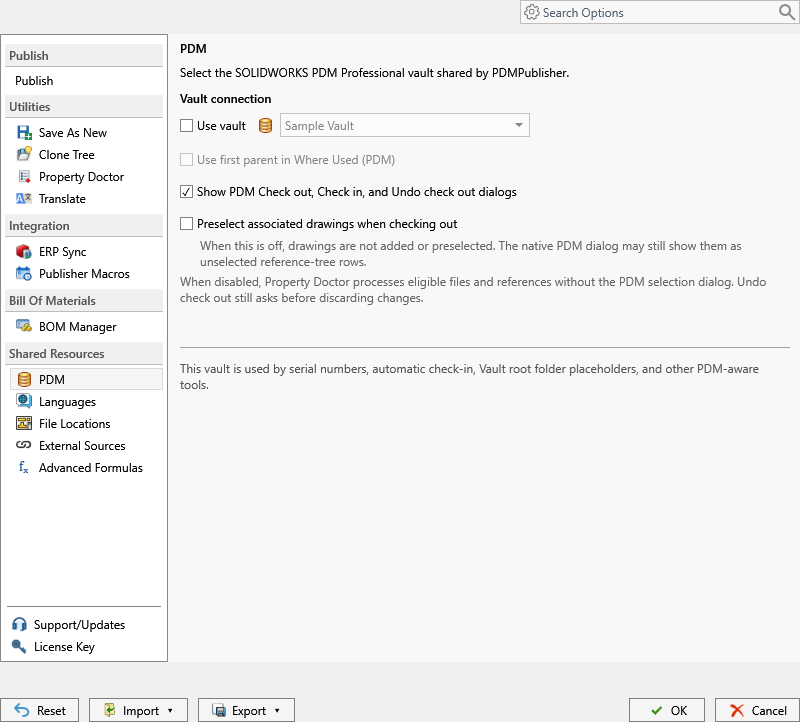
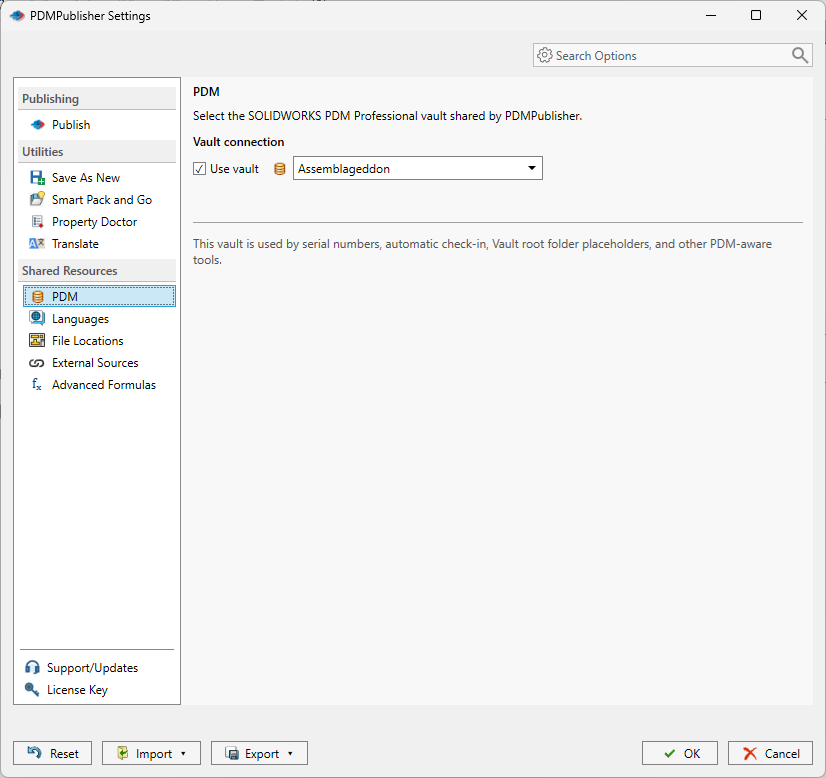
Open PDMPublisher > Settings > PDM. The page identifies the vault that PDM-aware controls should use; it does not move files, log the user in or grant PDM permissions. The selected vault must have a local vault view on the computer and the current Windows user must be able to log in to it.
| Control | What it does | Notes |
|---|---|---|
| Use vault | Enables PDM-aware behavior for commands and profiles that support it. | Off by default. Publishing that uses only local SOLIDWORKS files does not need it. |
| Vault list | Selects the local SOLIDWORKS PDM Professional vault shared by PDMPublisher. | Shows No local SOLIDWORKS PDM vault views are available when none exists; create or repair the view outside PDMPublisher. |
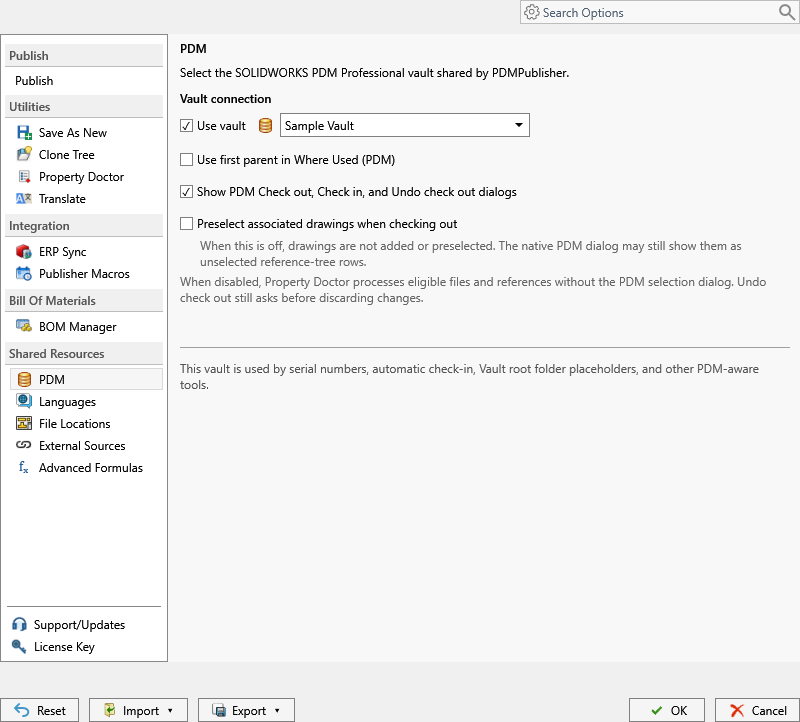
| Use first parent in Where Used (PDM) | Uses the first drawing parent returned by PDM Where Used before searching the drawing File Locations. | Speeds up drawing lookup when drawings live away from their models. |
| Show PDM Check out, Check in, and Undo check out dialogs | Shows the native PDM dialogs when PDMPublisher checks files out or in. | On by default. When disabled, Property Doctor processes eligible files and references without the PDM selection dialog; Undo check out still asks before discarding changes. |
| Preselect associated drawings when checking out | Adds associated drawing rows from Property Doctor to the checkout selection. | When off, drawings are not added or preselected; the native PDM dialog may still show them as unselected reference-tree rows. |
SOLIDWORKS add-in: where the vault is used
| Command | PDM feature | Behavior |
|---|---|---|
| Save As New | Use this serial number | Reserves a value from the selected PDM serial-number generator and makes it available to the name or destination template. |
| Save As New | Automatically check in to PDM | Adds and checks in the saved model and associated drawing. The destination must be inside the selected vault. Save As New also rejects a filename already present in the vault. |
| Save As New | PDM values in templates | Type { in the Filename or destination editor to insert a PDM value alongside document values, properties and folder values. |
| Clone Tree | PDM serial number | Assigns one reserved number per included row and reuses it when both the filename and folder need that number. Numbers are generated when Copy is selected; retries reuse the same number while the dialog is open. |
| Clone Tree | Copy latest PDM revision to destination | Copies the latest assigned revision directly to each destination without updating the local vault cache or reloading SOLIDWORKS. Vault files without an assigned revision cannot use it; unavailable revision data is rejected before copying. |
| Property Doctor | Document menu | Can check files in or out, get latest, resolve lightweight references and load documents; availability depends on document state and PDM access. Checkout dialogs and drawing preselection follow the PDM settings page. |
| Publish | PDM values, serial numbers, Vault root folder placeholders | The arrow beside Publish selects a profile only; it does not select a vault. Configure the shared vault under Settings > PDM first. |
| Company Settings | PDM group | An administrator can publish the PDM vault selection to every licensed seat. |
Community Edition and Premium both support PDM-backed values and locations when a local vault view and permissions allow access. Premium does not change SOLIDWORKS or PDM permissions.
Set it up in the SOLIDWORKS add-in
- Confirm the vault view exists locally and log in through SOLIDWORKS PDM File Explorer at least once.
- In SOLIDWORKS, open PDMPublisher > Settings and select the PDM page under Shared Resources.
- Enable Use vault and select the intended vault. Decide whether to keep Show PDM Check out, Check in, and Undo check out dialogs on (recommended while validating) and whether to enable Preselect associated drawings when checking out and Use first parent in Where Used (PDM).
- Select OK.
- On Settings > Save As New, enable Use this serial number and pick the generator; enable Automatically check in to PDM if copies should be checked in, with a destination inside the vault. On Settings > Clone Tree, pick the serial number used by rows that request a new number.
- In Publish, Save As New or Clone Tree templates, insert PDM values from the value menu rather than typing them.
- Run a test on a non-production file and check PDMPublisher > Logs.
Set it up in the PDM Professional task
- In the SOLIDWORKS PDM Administration tool, open the PDMPublisher task and go to the Options page.
- Set Export Location and Filename with vault placeholders, for example
(VaultRootFolder)\Released PDFs\($ProjectNumber)\(State)and(FileNameWithoutExtension)-(Revision). Insert PDM variables from the PDM Variables submenu of the>...menu. Enable Use @ Tab to Evaluate Paths if those variables are stored on@. - Enable Map Variables Between Source and Destination File, open the mapping dialog, select Add Mapping and set Source and Destination for each variable the PDF or STEP data card should carry (for example
Source Revision NumbertoRevision). The Value column shows what will be read. - Enable Create Reference from Destination File to Source File.
- Choose the version policy: Get latest revision only for release tasks, or Work with latest version for work-in-progress tasks.
- If drawings are not stored beside models, enable Use search to locate drawings.
- Under BOM, select a Template whose layout has name, configuration and quantity columns and pick the Calculation method.
- Enable Vault Activity Logs and set Log Folder (Vault Only) to
(VaultRootFolder)\Logs\PDMPublisherafter creating that folder. - Select OK, then attach the task to a workflow transition or run it from the right-click Tasks menu.
Recipes
- Searchable release PDFs (task). Filename
(FileNameWithoutExtension)-(Revision); mappingDescriptiontoDescription,Source Revision NumbertoRevision,Project NumbertoProject Number; Create Reference from Destination File to Source File on; Get latest revision only on. The PDF’s data card and reference tree now match the drawing’s. - Serial-numbered customer copies (add-in). Settings > PDM: Use vault on. Save As New profile: Filename template with the serial-number token, Use this serial number set to the part-number generator, destination inside the vault, Automatically check in to PDM on, Bring associated drawing on.
- Revision-exact package for a supplier (add-in). Clone Tree with Copy latest PDM revision to destination on, companion STEP and PDF files included, ZIP output on. The supplier receives the released revision even if the local cache holds newer work.
Tips, limits and troubleshooting
- The vault list is empty in the add-in. No local vault view exists for this Windows user. Create or repair it in SOLIDWORKS PDM, log in once through File Explorer, then reopen Settings.
- Selecting a vault grants nothing. PDM permissions, workflow permissions and login are unchanged; PDMPublisher operates as the logged-in user.
- Automatic check-in fails after the file was saved. Save As New reports that the new files already exist and must be inspected; the destination must be inside the selected vault and the user needs add and check-in rights there.
- Clone Tree refuses a row. Copy latest PDM revision to destination cannot be used for vault files without an assigned revision; PDMPublisher rejects unavailable PDM revision data before copying.
- Task exports miss references. The assembly and references need local copies on the task host. Get-latest there or enable Work with latest version.
- Task cannot check in the log file. Check permissions on the log folder and make sure
txtis not in the PDM auto-add user setting. - Empty variable in a path. An empty PDM variable contributes an empty string; for an associated drawing PDMPublisher may fall back to the part or assembly’s value. Design separators so an empty value does not create an extra folder level.
- Variables live on @. If
($ProjectNumber)resolves empty, the value is probably on the@tab; enable Use @ Tab to Evaluate Paths. - Files saved outside the vault are not tracked in the task’s Details Log tab and receive no variable mapping or PDM reference.
- Settings transfer. The add-in’s vault selection is part of the complete settings bundle and can be published through Company Settings, but the receiving computer still needs its own local vault view.
Availability
Available in PDMPublisher for SOLIDWORKS (the add-in) and PDMPublisher for PDM Professional (the task). PDMPublisher for PDM Professional is itself a vault task and has the deepest integration: variable mapping, PDM references, latest-revision publishing and vault logs. PDMPublisher for SOLIDWORKS connects to a local vault view through its PDM settings page for PDM values in templates, serial numbers, automatic check-in and revision-aware Clone Tree copies.
Documentation and related features
- PDM Settings documentation
- Task: map variables between source and destination
- Run as a SOLIDWORKS PDM task
- Save As New
- Clone Tree
- Property Doctor
- Extension-specific export locations
- Publishing profiles and Company Settings
Frequently asked questions
Can PDMPublisher put PDM variables on the exported PDF?
Yes. In the PDM task, enable Map Variables Between Source and Destination File and add a mapping per variable (Source to Destination, for example Source Revision Number to Revision). The exported PDF or STEP data card then carries those values and is searchable in PDM.
How do I use PDM variables in export paths and filenames?
Insert them as ($VariableName) from the PDM Variables submenu of the field’s >… menu, together with built-ins such as (VaultRootFolder), (State), (Revision) and (Version). Enable Use @ Tab to Evaluate Paths when the variables are stored on the @ tab.
Does PDMPublisher publish the latest version or the latest revision?
Your choice. Work with latest version retrieves the newest checked-in version; Get latest revision only retrieves the version behind the newest recorded revision with its saved references and takes precedence. A file without a revision fails under Get latest revision only.
How does the SOLIDWORKS add-in connect to PDM?
Through Settings > PDM: enable Use vault and pick a local vault view the current Windows user can log in to. That vault is then used for serial numbers, automatic check-in, Vault root folder placeholders, Clone Tree revision copies and Property Doctor check-out.
Can Save As New reserve a PDM serial number?
Yes. Enable Use this serial number on the Save As New settings page and insert the serial-number token in the filename or destination template. With Automatically check in to PDM enabled, the copy and its drawing are added and checked in, provided the destination is inside the selected vault.
Why is the exported file not linked to its source in PDM?
Enable Create Reference from Destination File to Source File in the task options. Files saved outside the vault cannot receive a PDM reference.