
A preview on an intranet page, a thumbnail in the ERP, a TIF for the archive: sometimes the drawing has to be a plain image. PDMPublisher writes JPEG, TIF or Bitmap per drawing from the same job as the PDF, in SOLIDWORKS or as a PDM Professional task.
Quick answer
- Open the drawing, tick JPEG (jpg) under File formats on the PDMPublisher tab, set a filename such as
(FileNameWithoutExtension)-(Revision), select Publish. - JPEG, TIF and Bitmap sit in the Web and images group of the File formats list (version 2026.08.05 or later).
- JPEG needs Premium in the add-in (the free Community Edition does PDF, DXF and STEP). The PDM task includes every format.
In SOLIDWORKS: step by step
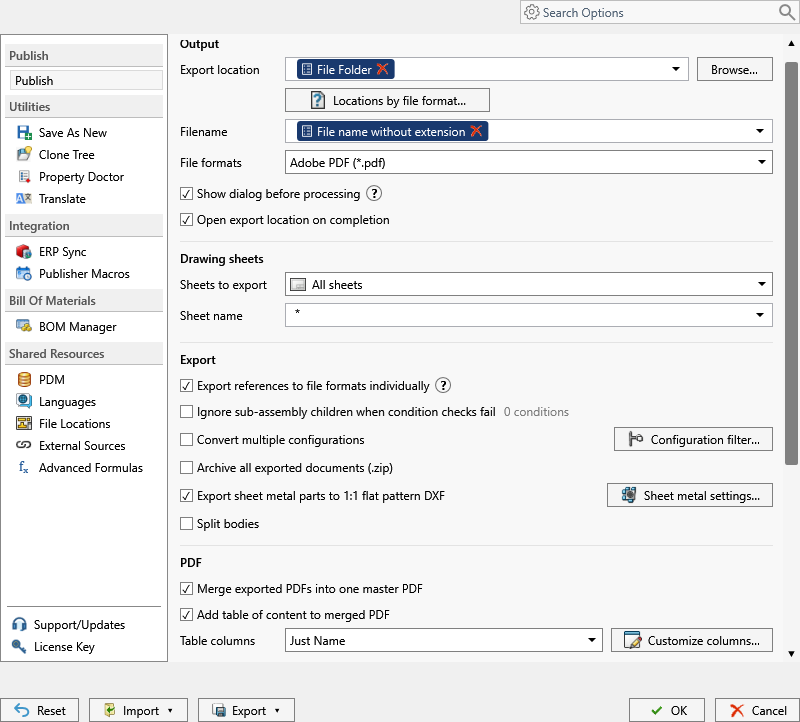
- Open the drawing (in a vault, Get Latest first so references resolve).
- On the PDMPublisher tab, select Settings > Publish.
- Set Export location and Filename, for example
(FileNameWithoutExtension)-(Revision). The.jpgextension is added for you. - Under File formats, tick JPEG (jpg). Tick TIF or Bitmap too if the target system wants those.
- Under Sheets to export, keep All sheets or choose Sheets matching name with a pattern such as
Sheet*. - Select PDMPublisher > Publish, confirm the review dialog, and check Publishing results.
As a PDM task: on every release
PDMPublisher for PDM Professional runs the same engine as a task, so the export happens when the file changes state, not when somebody remembers.
- In PDM Administration, right-click Tasks > New Task, choose PDMPublisher, name it and tick the task hosts.
- On the Options page set Export Location, for example
(VaultRootFolder)\Exports\JPEG(no trailing backslash), and the Filename. - Tick JPEG (jpg) under File Formats and set Sheets to export as in the add-in.
- For release workflows, enable Get latest revision only.
- Attach the task to a workflow transition, or leave it in the right-click menu and Scheduled Items.
Settings that matter
| Setting | What to put | Why |
|---|---|---|
| Filename | (FileNameWithoutExtension)-(Revision) or, in the task, ($PartNumber)_Rev($Revision) | Bracket-B.jpg cannot be confused with Bracket-C.jpg. |
| Sheets to export | All sheets, or Sheets matching name with Sheet* | Internal and manufacturing-only sheets stay out. A pattern that matches nothing falls back to every sheet and logs it. |
| Image size and colour | Set in SOLIDWORKS, Tools > Options > Export | PDMPublisher does not override the image export options. |
| Export location | (VaultRootFolder)\Exports\JPEG, no trailing backslash | Created if missing; you need add and edit permission there. |
Naming examples
(FileNameWithoutExtension)-(Revision)givesBracket-B.jpg.($PartNumber)_Rev($Revision)in the task names files by PDM part number.- Customize Location (Premium in the add-in, standard in the task) gives each format its own folder from one job.
If something looks wrong
- The image is the wrong size or colour depth: adjust the SOLIDWORKS image export options where the job runs.
- No JPEG entry in File formats: the add-in or task is older than 2026.08.05. Update PDMPublisher.
- Every sheet came out despite a pattern: the pattern matched nothing. Check the spelling and the evaluated
(ConfigurationName)in the Logs tab. - JPEG is missing from the results: the add-in is running as Community Edition. Activate a Premium key under PDMPublisher > License Key, or use the PDM task.
- Nothing in the folder: you need add and edit permission in the export location. Target a subfolder, not the vault root.
Keep going
Documentation
Frequently asked questions
How do I save a SOLIDWORKS drawing as a JPG automatically?
Tick JPEG (jpg) under File formats, set the export location and filename, and Publish. A PDM task does the same on a workflow transition.
Which image formats can PDMPublisher export?
JPEG (jpg), TIF (tif) and Bitmap (bmp), plus HTML, XAML, Adobe Illustrator and Photoshop from the same group.
Where are image resolution and color options set?
In SOLIDWORKS’ export options where the job runs. PDMPublisher has no image sub-options.
Is JPG export in the free Community Edition?
No. Community does PDF, DXF and STEP only. Images need Premium; the PDM task includes all formats.