
After the next ECO three drawings change, the page numbers shift and a hand-made contents page is wrong until somebody rebuilds it. PDMPublisher builds the master PDF with its contents page and bookmarks every time, in SOLIDWORKS or as a PDM Professional task at release.
Quick answer
- Bookmarks and the contents page belong to the merged PDF: tick Adobe PDF, Export references to file formats individually and Merge exported PDFs into one master PDF, then Add table of content to merged PDF.
- Table Columns decides what the contents page shows; the PDF Bookmarks pattern decides the sidebar text, for example
(FileNameWithoutExtension) - (Revision). - PDF is free in the Community Edition but a real assembly set needs Premium or the PDM task (5-reference limit).
In SOLIDWORKS: step by step
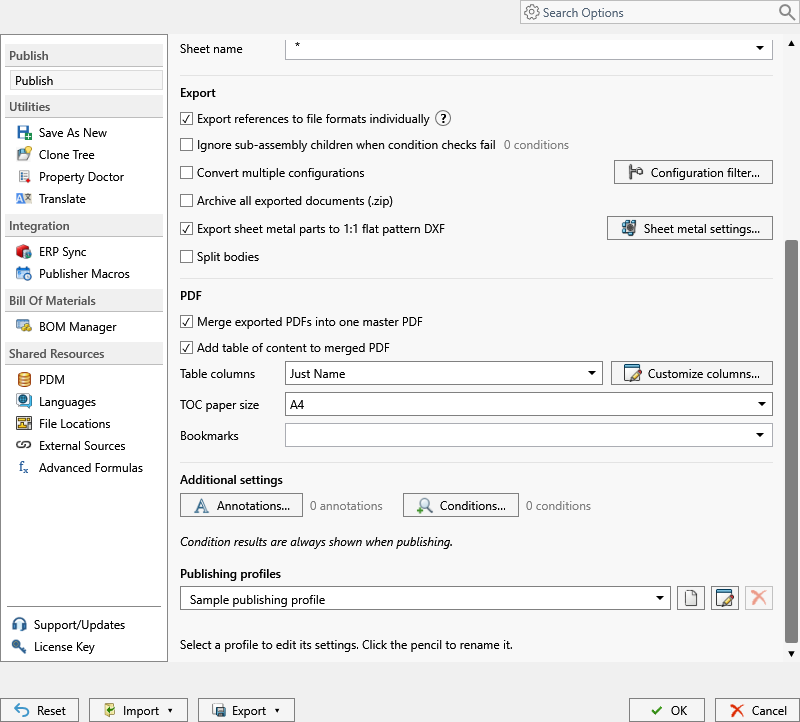
- Open the top-level assembly with every reference resolved. Each component’s drawing must sit beside it with the same filename.
- On the PDMPublisher tab, select Settings > Publish and tick Adobe PDF (pdf) under File formats.
- Tick Export references to file formats individually.
- In the PDF section, tick Merge exported PDFs into one master PDF, then Add table of content to merged PDF, and choose Table Columns (Just Name, Name & Quantity, or Custom Columns set up under Customize Table).
- Set the PDF Bookmarks pattern, such as
(FileNameWithoutExtension) - (Revision). - Select PDMPublisher > Publish, confirm the review dialog, and check Publishing results.
As a PDM task: on every release
PDMPublisher for PDM Professional runs the same engine as a task, so the export happens when the file changes state, not when somebody remembers.
- In PDM Administration, right-click Tasks > New Task, choose PDMPublisher, name it and tick the task hosts.
- On the Options page set Export Location, for example
(VaultRootFolder)\Exports\Master PDFs, and the Filename. Tick Adobe PDF under File Formats. - Set Template to a PDM BOM layout and enable Export references to file formats individually. Use drawing-derived BOM orders the pages by the assembly drawing’s BOM.
- Enable Merge exported PDFs into one master PDF, Add table of content to merged PDF, Table columns and the bookmarks pattern; PDM variables such as
($Description)work here. - Enable Use PDM search to locate drawings, then attach the task to the release transition.
Settings that matter
| Setting | What to put | Why |
|---|---|---|
| Table Columns | Name & Quantity, or Custom Columns | Quantity on the contents page saves the reader a trip to the BOM. |
| PDF Bookmarks | (FileNameWithoutExtension) - (Revision) or ($PartNumber) ($Description) | Readers jump straight to a drawing from the sidebar. |
| Order | Use drawing-derived BOM (task) | Contents and pages follow the assembly drawing’s BOM. |
Naming examples
- The master PDF takes the assembly filename:
Conveyor-B.pdf. - Bookmark text follows the pattern per drawing:
Bracket - B,Frame - C. (VaultRootFolder)\Released Packages\($ProjectNumber)in the task files one package per project.
If something looks wrong
- No bookmarks or contents page: they belong to the merged PDF. Check that PDF is ticked, references are on and the source is an assembly; the contents controls stay disabled until merge and table of content are both on.
- A drawing is missing from the master PDF: no same-name drawing beside that model. In the task, enable Use PDM search to locate drawings.
- The reader complains about a missing font: that is the reader, not the file.
- Community Edition stopped at 5 references: the assembly is bigger than the free limit.
Keep going
Documentation
Frequently asked questions
How do I get bookmarks in a SOLIDWORKS drawing PDF?
They go into the merged master PDF of an assembly. Tick Adobe PDF, enable Export references individually and Merge exported PDFs into one master PDF, set the PDF Bookmarks pattern, and Publish with the assembly open.
Can the PDF have a table of contents with quantities?
Yes. Enable Add table of content to merged PDF and set Table Columns to Name & Quantityor Custom Columns for property columns.
Why are the table-of-contents settings greyed out?
Both Merge exported PDFs into one master PDF and Add table of content to merged PDF must be on first.
Can a PDM task create the bookmarked PDF at release?
Yes. Create a PDMPublisher task with PDF, a BOM Template, references, merge, table of content and a bookmark pattern, and attach it to the release transition.