
A merged drawing package is only useful if a reader can find the sheet they need. Add table of content to merged PDF inserts a generated contents page into the master PDF that PDMPublisher builds from an assembly, listing every included document with its name, its BOM quantity and, if you want, any SOLIDWORKS custom property such as part number, revision or material. The contents page is created from the same reference and quantity data that drives the export, so it always matches what is actually in the PDF.
What the table of contents does
When PDMPublisher merges the individual PDFs of an assembly into one master PDF, the table of contents option adds a generated contents page to that master PDF. It is created for the merged PDF only; separate, unmerged PDFs never receive a contents page. The page lists the documents in the package in processing order, and the Table columns setting decides what each row shows.
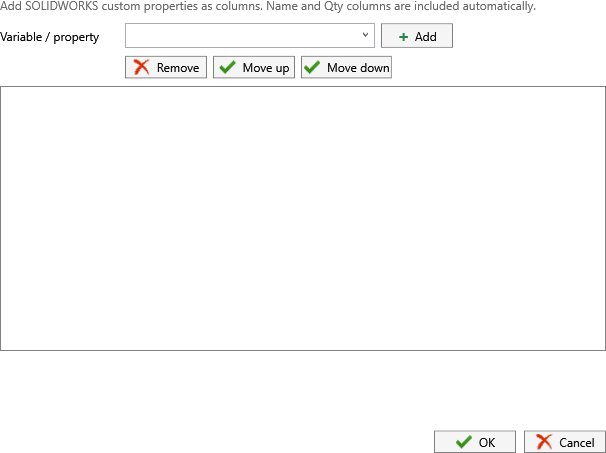
Three column modes are available. Just Name lists only the file or item name. Name & Quantity adds the quantity calculated for each reference from the BOM. Custom Columns lets you add SOLIDWORKS custom properties as extra columns through the Customize Table dialog, with name and quantity still included automatically.
Because the same job can also write PDF bookmarks, the reader gets both: a printed index on the first pages and clickable navigation in the reader’s sidebar.
Why it matters
A contents page turns a stack of drawings into a document. For a supplier it is the parts list they quote from: every item, how many, which revision, what material, followed by the drawing that defines it. For an internal reviewer it is a checklist of what was released. For a customer it is the cover sheet that makes a 150-page PDF look deliberate rather than dumped.
Building that page by hand is exactly the kind of task that silently goes wrong: someone edits the assembly, adds a bracket, and the contents page in the package still lists last month’s structure. PDMPublisher generates the page from the reference data of the current job, so the index and the drawings cannot disagree. When the job runs on a PDM workflow transition, the package and its index are regenerated on every release without anyone opening a PDF editor.
- RFQ packages with a quantity column so purchasing does not send a separate BOM.
- Release records where the contents page doubles as the list of drawings released at that revision.
- Customer documentation with part number, revision and material columns pulled from custom properties.
How it works, step by step
- The assembly is published with Export references to file formats individually and
PDFin File formats. In the add-in the references come from the open assembly; in the task they are calculated from the selected BOM Template with the chosen Calculation method, or read from the drawing’s first named BOM when Use drawing-derived BOM is enabled. - Conditions filter the references. Only references that pass are exported, so only they appear on the contents page.
- Each reference’s same-name drawing is exported to an individual PDF, respecting Sheets to export and any annotations.
- With Merge exported PDFs into one master PDF enabled, the individual PDFs are combined in processing order.
- With Add table of content to merged PDF enabled, PDMPublisher generates the contents page. For each document it writes the name, the quantity if
Name & QuantityorCustom Columnsis selected, and the values of any custom properties added in Customize Table, in the column order you defined. - If a PDF bookmarks pattern is set, bookmarks are added alongside the contents page.
- The master PDF is saved to the Export location. In the vault, an existing file receives a new version with a check-in comment identifying PDMPublisher.
- The result is reported in Publishing results (add-in) or the vault activity log (task). Quantity details, including any launch multiplier, are recorded in the log.
Every setting that affects the table of contents
| Setting | What it does | Notes / default |
|---|---|---|
| Add table of content to merged PDF | Adds a generated contents page to the merged PDF and enables the related controls. | Depends on merged assembly PDF output. Unavailable until merging is enabled. |
| Table columns | Dropdown: Just Name, Name & Quantity, Custom Columns. | Custom Columns uses the columns configured with Customize Table. |
| Customize Table (button) | Opens the column dialog: choose a Variable / property from the dropdown, Add it, then Remove, Move up or Move down to order the columns. OK saves, Cancel discards. | Name and Qty columns are included automatically; the dialog adds SOLIDWORKS custom properties as additional columns. |
| Merge exported PDFs into one master PDF | Creates the master PDF that receives the contents page. | Requires PDF in File formats, reference export, and an assembly source. |
| PDF bookmarks | Pattern for bookmark text inside the merged PDF. | Complements the contents page with in-reader navigation. |
| Export references to file formats individually | Produces the per-reference PDFs the merge and the contents page are built from. | Task: select a BOM Template first. |
| Template (task) | PDM BOM layout used to calculate references and the quantities shown in the Qty column. | Must include <Name>, <Configuration> and <RefCount>. |
| Calculation method (task) | As built uses references as checked in; Latest uses the latest references in PDM. | Affects which rows appear and their quantities. |
| Use drawing-derived BOM (task) | Takes structure and quantities from the first named BOM on the assembly drawing, with the Template as fallback. | Confirm the intended named BOM is the first one returned by PDM. |
| Ask user to select configuration on startup (task) | Prompts for a configuration and a Custom Quantity Multiplier that multiplies (BOMQuantity). | A calculated 2 with multiplier 3 shows 6. The log notes that a multiplier was used. |
| Ignore sub-assembly children when condition checks fail | Removes the children of a rejected sub-assembly from the job and therefore from the contents page. | Leave off if those children should still be listed. |
Quantities and placeholders
The Qty column uses the same quantity as the (BOMQuantity) placeholder. Understanding where it comes from avoids surprises on the contents page.
- Bookmark pattern
(FileNameWithoutExtension) (x(BOMQuantity))givesCone (x4), matching the Qty column on the contents page. - Filename
(FileNameWithoutExtension)-(Revision)keeps the individual PDFs revision-stamped; adding a Revision custom-property column in Customize Table shows the same revision on the index. - Export location
(VaultRootFolder)\Release Packages\(TopAssemblyName)\(Revision)keeps the master PDF, with its contents page, next to the individual PDFs of that revision.
| Source | Behavior | Notes |
|---|---|---|
| PDM BOM Template (task) | PDMPublisher builds a BOM in memory from the top-level assembly using the selected layout and its <RefCount> column. | Suppressed, virtual, envelope and BOM-excluded components are ignored. These settings come from the SOLIDWORKS component properties. |
| Drawing-derived BOM (task) | The first named BOM saved on the assembly drawing supplies rows and quantities. | Falls back to the Template when the drawing or a usable BOM is unavailable; the log explains why. |
| Resolved assembly (add-in) | References are read directly from the open assembly. | No BOM template required. |
| Launch multiplier (task) | The Custom Quantity Multiplier entered at task launch multiplies every quantity. | Only with Ask user to select configuration on startup. |
Set it up in the SOLIDWORKS add-in
- Open the assembly in SOLIDWORKS and save it with references resolved.
- Select PDMPublisher > Settings > Publish and select or create a profile.
- Set Export location and Filename, and tick Adobe PDF in File formats.
- Under Export, enable Export references to file formats individually.
- Scroll to the PDF section. Enable Merge exported PDFs into one master PDF, then Add table of content to merged PDF.
- Set Table columns to
Just Name,Name & QuantityorCustom Columns. - For custom columns, select Customize Table, pick a property in Variable / property and select Add; repeat for each column, order with Move up and Move down, then OK.
- Optionally enter a PDF bookmarks pattern and build conditions with PDMPublisher > Conditions. Select OK to save the profile.
- Select PDMPublisher > Publish, confirm the review list if it appears, then open the master PDF from Publishing results.
Community Edition processes up to 5 references per run. For a full package, activate Premium under PDMPublisher > License Key.
Set it up in the PDM Professional task
- In PDM Administration, create a task with the PDMPublisher add-in and permit the task hosts under Execution Method.
- On Options, select the BOM Template with
<Name>,<Configuration>and<RefCount>columns, and set the Calculation method. This is what fills the Qty column. - Set Export Location, Filename and PDF in File Formats; confirm Use this version of SOLIDWORKS.
- Enable Export references to file formats individually and keep Export affected document on.
- Under PDF, enable Merge exported PDFs into one master PDF and Add table of content to merged PDF, choose Table columns, and configure custom columns if needed.
- Optionally set PDF bookmarks, Use drawing-derived BOM, Use search to locate drawings, and Get latest revision only for release workflows.
- Define Conditions to restrict which references are listed.
- Enable Vault Activity Logs with a writable Log Folder (Vault Only), select OK, and attach the task to a workflow transition or run it from the right-click Tasks menu.
Recipes
| Scenario | Settings | Result |
|---|---|---|
| Quote package | Merge on. Add table of content on. Table columns Name & Quantity. Conditions: Make/Buy equals Make. Bookmarks (FileNameWithoutExtension) (x(BOMQuantity)). | A master PDF whose first page lists every made part with its quantity, followed by the drawings in the same order. |
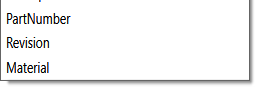
| Customer documentation | Merge on. Table columns Custom Columns; Customize Table adds PartNumber, Revision, Material. Sheets matching name CUSTOMER*. | An index with part number, revision and material beside each name, and only customer-facing sheets in the body. |
| Release record from the drawing BOM | Task on the Released transition. Use drawing-derived BOM on, Use search to locate drawings on, Template still selected. Get latest revision only on. Table columns Name & Quantity. | The contents page mirrors the named BOM on the assembly drawing at the released revision; the calculated BOM is used only as a fallback, and the log says when. |
Tips, limits and troubleshooting
- Table-of-contents controls are disabled. They stay unavailable until both Merge exported PDFs into one master PDF and Add table of content to merged PDF are enabled.
- No contents page in separate PDFs. By design: the table of contents is generated for the merged PDF only.
- Quantities are wrong or missing (task). The BOM layout must include
<RefCount>and<Configuration>. Check whether the Calculation method (As built vs Latest) matches what you expect, and look for a launch multiplier in the log. - Rows missing. Components that are suppressed, virtual, envelope or excluded from the BOM are ignored, and references rejected by conditions are not exported. Use the Skipped filter in the add-in log.
- Drawing-derived BOM picked the wrong BOM. PDMPublisher uses the first named BOM returned by PDM. Check the
Drawing-derived BOM:log lines for which BOM was selected and how many rows loaded. - Custom property column is empty. The value comes from the SOLIDWORKS custom property on each component; confirm the property exists on the file or configuration being exported.
- Font warning when opening the merged PDF. The Helvetica-Bold message comes from the PDF reader; install the font.
- Support. Save the add-in log with Save… immediately after the job, or open the task log from the Task Details tab, and include the assembly name and the expected column set.
Availability
Available in PDMPublisher for SOLIDWORKS (the add-in) and PDMPublisher for PDM Professional (the task). The table of contents is shared by the SOLIDWORKS add-in and the PDM Professional task. It depends on Merge exported PDFs into one master PDF, which in turn depends on assembly reference export.
Documentation and related features
- Run a Publish Job in the SOLIDWORKS add-in
- Add Table of Content to Merged PDF
- Merge multiple drawings into one PDF
- PDF bookmarks
- SOLIDWORKS assembly documents
- Conditional assembly processing
- BOM Manager
- Run as a SOLIDWORKS PDM task
Frequently asked questions
How do I add a table of contents to a merged PDF of SOLIDWORKS drawings?
Publish the assembly with PDF selected, Export references to file formats individually on, Merge exported PDFs into one master PDF on, and Add table of content to merged PDF on. Choose the columns under Table columns.
Can the PDF table of contents show quantities?
Yes. Set Table columns to Name & Quantity, or use Custom Columns, where name and quantity are included automatically and you add further properties.
Which columns can I put in the table of contents?
Name and quantity are always included. With Custom Columns, the Customize Table dialog adds any SOLIDWORKS custom property, such as PartNumber, Revision or Material, in the order you set.
Where does the quantity come from?
In the PDM task, from the selected BOM Template’s RefCount column (or the drawing’s named BOM when Use drawing-derived BOM is on), multiplied by any launch multiplier. In the add-in, from the resolved assembly references.
Does the table of contents work for a single drawing?
No. It is generated only for the merged PDF that PDMPublisher builds from an assembly and its references.
Is the table of contents available in the free Community Edition?
Yes, but the Community Edition processes up to 5 references per run. Premium and the PDM Professional task have no such limit.