
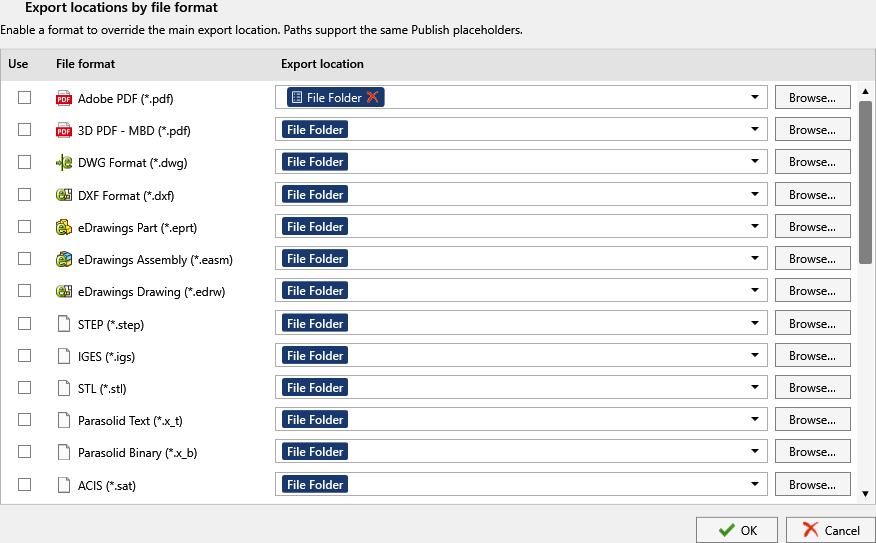
One publish job, three audiences: the PDF belongs in the released-documents folder in the vault, the DXF on the laser cutter’s share, the STEP in the supplier drop. Locations by file format lets each format override the main Export location with its own folder, built from the same placeholders.
In short
- Open Locations by file format under Export location, enable the row for a format and give it a path; every other format keeps the main location.
- Placeholders work in every row:
\\server\suppliers\STEP\($ProjectNumber). - Premium in the add-in; standard in the PDM task. Community Edition writes every format to the main location.
How it works
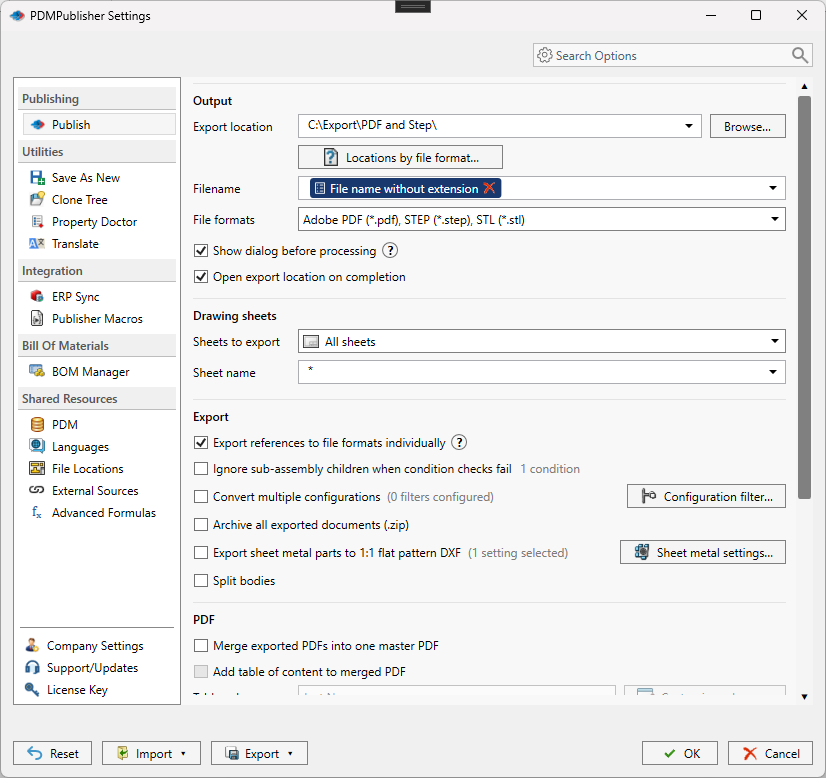
- Set the main Export location and Filename as usual.
- Select Locations by file format next to Export location.
- Enable the row for a format (pdf, dxf, step) and enter its folder, with placeholders if you like.
- Publish. Enabled rows override the main location for that format; folders are created if missing.
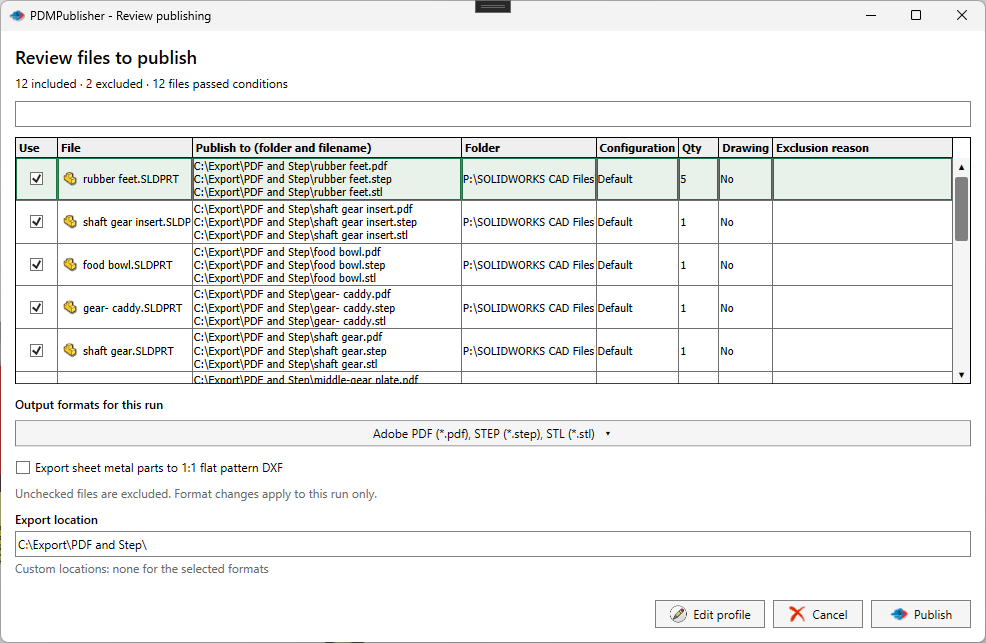
- Check the review dialog or the Logs tab: it shows the evaluated folder and filename for every format.
Settings that matter
| Setting | What to put | Why |
|---|---|---|
| pdf row | (VaultRootFolder)\Released PDFs\(State) | Released documents stay in the vault, filed by state. |
| dxf row | \\server\laser\DXF | The cutter reads straight from its share. |
| step row | \\server\suppliers\STEP\($ProjectNumber) | One supplier folder per project. |
| Trailing backslash | Never | A path ending in a backslash fails. |
Recipes
| You want | Set | You get |
|---|---|---|
| Three destinations from one release task | Main location in the vault; dxf and step rows on the shares; attached to the Released transition | PDF, DXF and STEP land where each audience looks. |
| A part-number tree | Main location (VaultRootFolder)\Exports\(FileNameNumberRange) | Outputs filed by number range, 10000 to 10999 and so on. |
If something looks wrong
- Locations by file format is greyed out: it is Premium in the add-in.
- Files went to the wrong folder: only rows with Use enabled override; check the evaluated paths in the review dialog or the task log.
- The path ends with a backslash: remove it.
- Nothing in the folder: you need add and edit permission there; the vault root is usually locked.
Availability
Locations by file format is shared by PDMPublisher for SOLIDWORKS and the PDM Professional task. Premium in the add-in, standard in the task.
Keep going
Documentation
Frequently asked questions
Can PDMPublisher save PDFs and DXFs to different folders in one job?
Yes. Open Locations by file format (Customize Location in the task), enable the DXF row and give it its own path. PDFs keep using the main Export location.
Do extension-specific locations support placeholders?
Yes. Each row accepts the same placeholders as Export location, such as (VaultRootFolder), (State), (FileNameNumberRange) and PDM variables.
Is Locations by file format available in the free add-in?
No. In PDMPublisher for SOLIDWORKS it is a Premium feature. The Community Edition uses one Export location for all formats. The PDM Professional task includes it.
How do I organize exports by part number range?
Use (FileNameNumberRange) in the path for fully numeric filenames, or (FileNameNumberRangeFirst4Digits) to build a range from the first digits of names like PART-123456-A.
What happens if the export folder does not exist?
PDMPublisher creates it before saving. Inside the vault the user still needs permission to create and check in files there.
How can I trace an exported PDF back to its source drawing in PDM?
In the PDM task, enable Create Reference from Destination File to Source File. The exported file then carries a PDM reference to the model or drawing that produced it.
Why is Open export location on completion not showing my DXFs?
It opens the main Export location only. Formats with an extension-specific override are written to their own folders.