
3MF is the format built to replace STL for 3D printing: it stores the mesh with its units, so a part never arrives 25.4 times too big because a slicer guessed inches. PDMPublisher writes one 3MF per part, configuration and body in one run, with STL beside it for printers that still need it, in SOLIDWORKS or as a PDM Professional task.
Quick answer
- Open the part, tick 3MF (3mf) under File formats on the PDMPublisher tab, set a filename such as
(FileNameWithoutExtension)-(Revision), select Publish. - Tick Convert multiple configurations and put
(ConfigurationName)in the filename to get every configuration, not just the active one. - 3MF needs Premium in the add-in (the free Community Edition does PDF, DXF and STEP). The PDM task includes every format.
In SOLIDWORKS: step by step
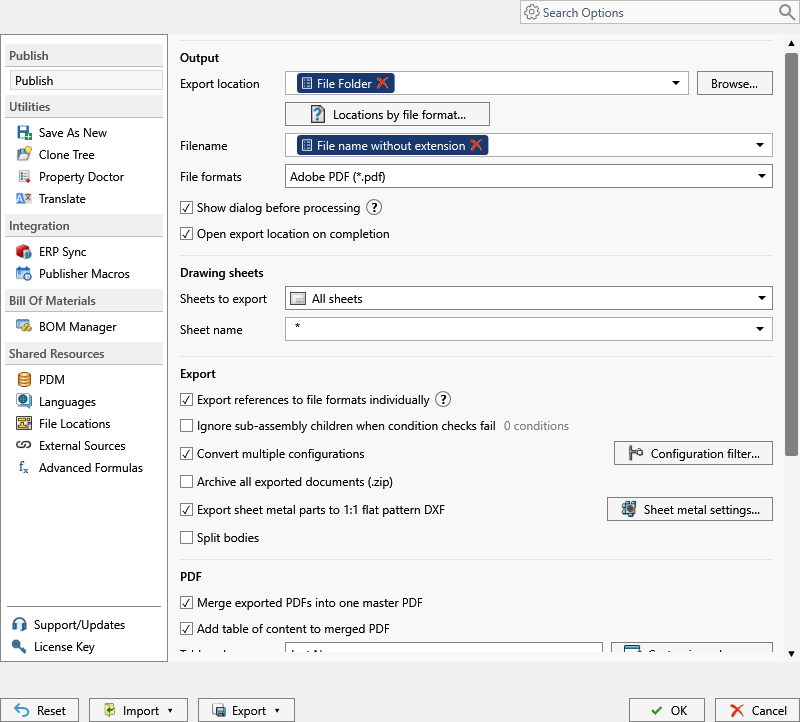
- Open the part (or an assembly if you want all its parts).
- On the PDMPublisher tab, select Settings > Publish.
- Set Export location and Filename, for example
(FileNameWithoutExtension)-(Revision). The.3mfextension is added for you. - Under File formats, tick 3MF (3mf). Tick STL too if some printers still need it.
- For every configuration, tick Convert multiple configurations and add
(ConfigurationName)to the filename. Use the Configuration Filter to includePROD*or exclude*Flat*. - For one file per body, tick Split bodies.
- Select PDMPublisher > Publish, confirm the review dialog, and check Publishing results.
As a PDM task: on every release
PDMPublisher for PDM Professional runs the same engine as a task, so the export happens when the file changes state, not when somebody remembers.
- In PDM Administration, right-click Tasks > New Task, choose PDMPublisher, name it and tick the task hosts.
- On the Options page set Export Location, for example
(VaultRootFolder)\Exports\3MF(no trailing backslash), and the Filename. - Tick 3MF (3mf) under File Formats.
- Enable Convert multiple configurations and Split bodies as needed, with
(ConfigurationName)in the filename. - For release workflows, enable Get latest revision only, then attach the task to a workflow transition.
Settings that matter
| Setting | What to put | Why |
|---|---|---|
| Filename | (FileNameWithoutExtension)-(ConfigurationName) | Configurations do not overwrite each other. |
| Configuration Filter | PROD* to include, *Flat* to exclude | Only the variants the receiver should see. |
| Split bodies | On for multi-body parts | One file per body, body name appended. |
| Mesh quality | Set in SOLIDWORKS, Tools > Options > Export | PDMPublisher does not override it. |
| Export location | (VaultRootFolder)\Exports\3MF, no trailing backslash | Created if missing; you need add and edit permission there. |
Naming examples
(FileNameWithoutExtension)-(Revision)givesBracket-B.3mf.(FileNameWithoutExtension)-(ConfigurationName)givesBracket-Default.3mfandBracket-Machined.3mf.(VaultRootFolder)\Supplier Packages\($ProjectNumber)\(TargetExtension)in the task files each format in its own subfolder per project.
Customize Location (Premium in the add-in, standard in the task) gives each format its own folder from one job.
If something looks wrong
- A flat pattern was printed: exclude
*Flat*, or include onlyPRINT*, in the Configuration Filter. - Only the active configuration came out: Convert multiple configurations is off, or the filename has no
(ConfigurationName). - 3MF is missing from the results: the add-in is running as Community Edition. Activate a Premium key under PDMPublisher > License Key, or use the PDM task.
- The file imports oddly on the other side: PDMPublisher has no 3MF sub-options. SOLIDWORKS export settings under Tools > Options > Export apply where the job runs.
- Nothing in the folder: you need add and edit permission in the export location. Target a subfolder, not the vault root.
Keep going
Documentation
Frequently asked questions
Can SOLIDWORKS export 3MF in batch?
Not natively, but PDMPublisher can. Tick 3MF under File formats, set a location and filename pattern and Publish; every part, configuration and body becomes a 3MF.
Should I export 3MF or STL from SOLIDWORKS for 3D printing?
3MF carries units and multi-object data; STL is the older mesh-only format. PDMPublisher lists both, so tick both and let the print operator choose.
How do I get one 3MF per body of a multi-body part?
Tick Split bodies. Each body goes to its own file with the body name appended.
Can a PDM Professional task produce 3MF files automatically?
Yes. A PDMPublisher task with 3mf ticked can run on a workflow transition, from the right-click menu or as a scheduled item.