
The hard part of a SOLIDWORKS macro is rarely the macro. It is the naming, the PDM check-in, the property fixes on a dozen files, the push to ERP. Publisher Macros exposes Save As New, Property Doctor, Clone Tree and ERP Sync to VBA as late-bound methods, so a macro calls a saved profile by name and PDMPublisher does the rest.
In short
- Get the publisher object from the loaded add-in, then call
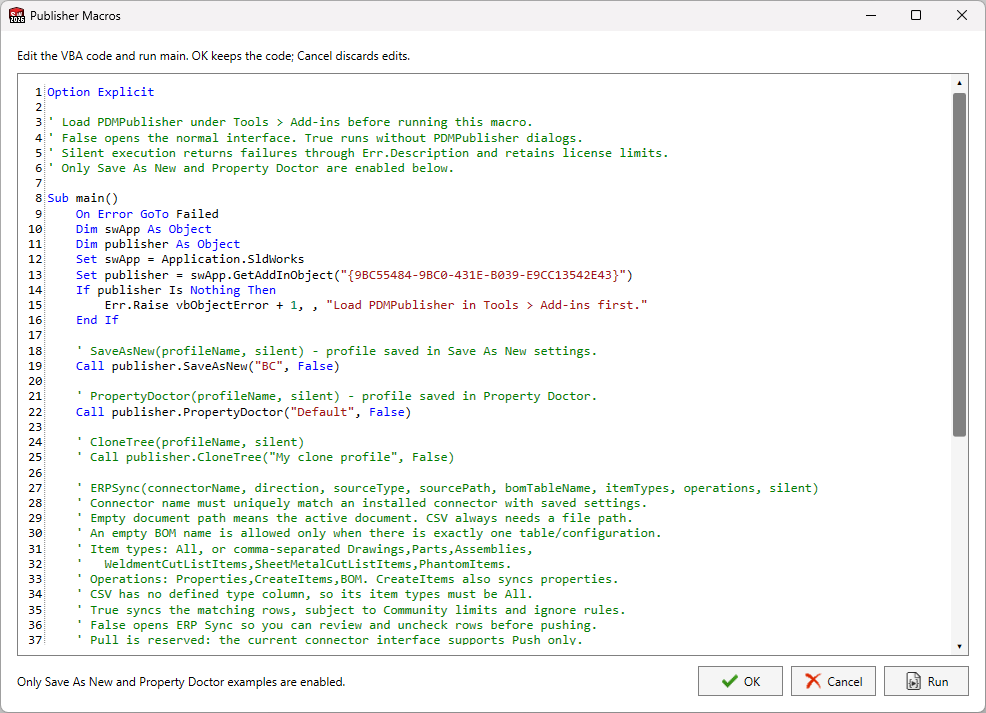
publisher.SaveAsNew("BC", False),PropertyDoctor,CloneTreeorERPSyncwith a profile or connector name. - No type library reference is needed; the calls are late-bound. The built-in editor ships with a complete
Sub main()example. - The silent argument runs without dialogs; it needs Premium for Save As New and refuses to overwrite existing files.
How it works
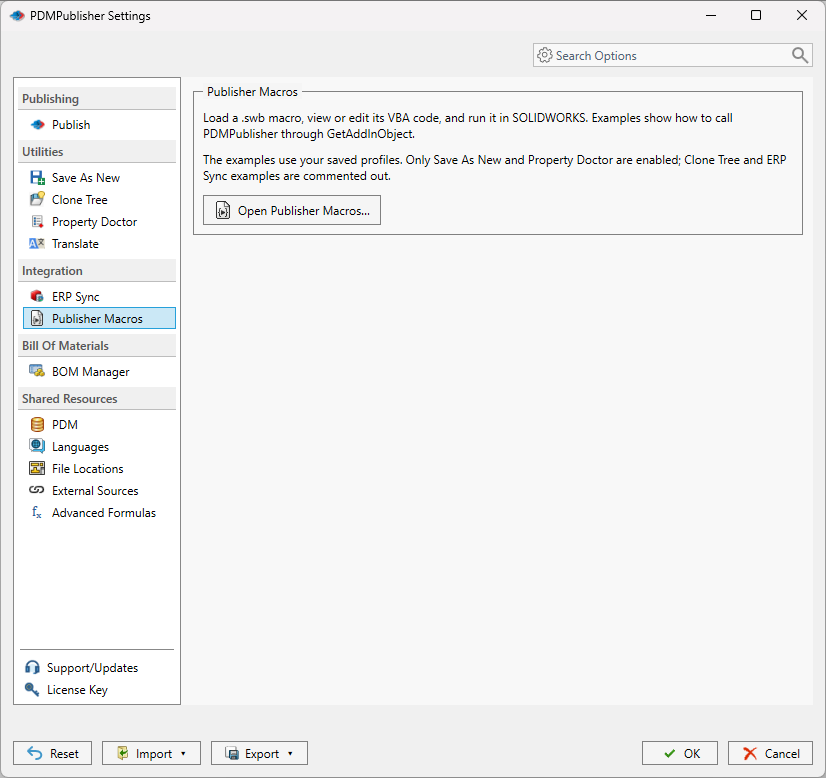
- Load PDMPublisher under Tools > Add-Ins and save the profiles and connectors the macro will use.
- Open PDMPublisher > Publisher Macros from the CommandManager.
- Replace the example profile and connector names with names that exist on this computer, and uncomment only the commands you want to run.
- Select Run; it executes the displayed code through SOLIDWORKS and needs a
Sub main()entry point. - Select OK to keep the edited code for the next session, or copy it into your own .swp macro.

Settings that matter
| Setting | What to put | Why |
|---|---|---|
| Profile name | An existing, unique profile name | Names are case-insensitive; a blank or ambiguous name fails. |
| silent | False to show the dialogs, True for unattended runs | Silent Save As New needs Premium and never overwrites. |
| ERPSync arguments | Connector name, direction, source type and path | Non-silent mode still lets you review and uncheck rows. |
| Entry point | Sub main() | Run looks for exactly this name. |
Recipes
| You want | Set | You get |
|---|---|---|
| A customer variant in one click | Call publisher.SaveAsNew("BC", False) | The destination dialog opens, the copy is saved and checked in if the profile says so. |
| Property cleanup before release | Call publisher.PropertyDoctor("Default", False) | The profile’s actions are previewed, then applied. |
| A nightly BOM push | Call publisher.ERPSync("Odoo", "Push", "FeatureTree", "", True) from a scheduled macro | Items and BOM pushed with the saved mappings. |
If something looks wrong
- The publisher object is Nothing: PDMPublisher is not loaded. Enable it under Tools > Add-Ins.
- Run does nothing or reports a missing entry point: keep
Sub main()exactly as in the example. - A profile name fails: it must exist on this computer and be unique.
- Silent Save As New fails: it needs Premium, refuses existing targets, and rejects profiles that prompt the user.
Availability
Publisher Macros is part of PDMPublisher for SOLIDWORKS, the add-in that runs inside SOLIDWORKS. It is not part of the PDM Professional task. Available in the Community Edition; silent Save As New needs Premium.
Keep going
Documentation
Frequently asked questions
Can I call PDMPublisher from a SOLIDWORKS VBA macro?
Yes. Get the add-in object with Application.SldWorks.GetAddInObject(“{9BC55484-9BC0-431E-B039-E9CC13542E43}”) and call SaveAsNew, PropertyDoctor, CloneTree or ERPSync on it. Late binding means no VBA reference is required; the add-in only has to be loaded under Tools > Add-Ins.
Do I need a PDMPublisher type library reference in the VBA editor?
No. Publisher Macros uses late binding (Dim publisher As Object), so the macro works without adding any reference.
Can Save As New run without any dialog?
Yes with silent = True, which requires Premium. The saved profile must contain enough destination information to run without a prompt, and it cannot use prompt placeholders, after-save macros or automatic PDM check-in. Existing files are never overwritten.
Why does ERPSync fail when I pass silent = True?
ERP Push and Pull always require the user to review the diff before any remote or SOLIDWORKS change, so silent execution stops before connecting and returns an error. Pass False and the review window opens with your arguments preselected.
Are my macro edits saved?
Select OK in the Publisher Macros editor to retain the code for the next session; Cancel discards the edits. The retained code is stored locally for the current Windows user and is not included in exported settings bundles.
Do the older SaveAsNewWithProfile methods still work?
Yes. SaveAsNewWithProfile, CloneTreeWithProfile and PropertyDoctorWithProfile remain supported alongside the current SaveAsNew, CloneTree and PropertyDoctor methods.