
People look for Batch+ alternatives for one of two reasons: they do not want to write and maintain macros, or they need the PDM Professional integration without buying the top edition. Batch+ by Xarial is a good macro runner with crash monitoring and a command line; the round-up below covers six other ways to batch export SOLIDWORKS files, and for release publishing the verdict is PDMPublisher, which turns formats, naming, stamping, merging and PDM check-in into settings.
At a glance
Marks reflect what each vendor documents as of September 2026: ✓ documented, ◐ partial or edition-limited, ✗ not documented. Batch+ is included as the baseline.
| Capability | PDMPublisher | CAD+ Batch+ | CUSTOMTOOLS | Drew | Task Scheduler | PDM Convert task |
|---|---|---|---|---|---|---|
| 25+ export formats, several per run | ✓ | ◐ | ✓ | ✗ | ✗ | ◐ |
| Export without writing a macro | ✓ | ✗ | ✓ | ✓ | ✓ | ✓ |
| Merged PDF with TOC and bookmarks | ✓ | ✗ | ◐ | ✗ | ✗ | ✗ |
| Annotations and watermarks | ✓ | ✗ | ◐ | ✗ | ✗ | ✗ |
| Conditions on variables, state or filename | ✓ | ◐ | ◐ | ✗ | ✗ | ✗ |
| Per-configuration and per-sheet export | ✓ | ◐ | ◐ | ✗ | ✗ | ✗ |
| PDM Professional task on workflow transition | ✓ | ◐ | ✓ | ✗ | ✗ | ✓ |
| ERP connectors | ✓ | ✗ | ✓ | ✗ | ✗ | ✗ |
| Free edition or included | ✓ | ◐ | ✗ | ✗ | ◐ | ✓ |
| Crash and hang monitoring | ✗ | ✓ | ✗ | ✗ | ✗ | ✗ |
Competitor information from each vendor’s documentation as of September 2026; check their sites for current details. Prices below are the vendors’ published figures in their own currencies. CADshift and a DIY macro are covered in the text but omitted from the table to keep it readable.
CAD+ Batch+ (the baseline)
Batch+ runs your VBA, VSTA or xCAD macros against a batch of models, monitors SOLIDWORKS for crashes and hangs, and has a command line. Community Edition is free under Xarial’s eligibility thresholds; the PDM Professional integration needs the Premium edition. Formats, naming, merging and stamping are your macro’s job.
PDMPublisher
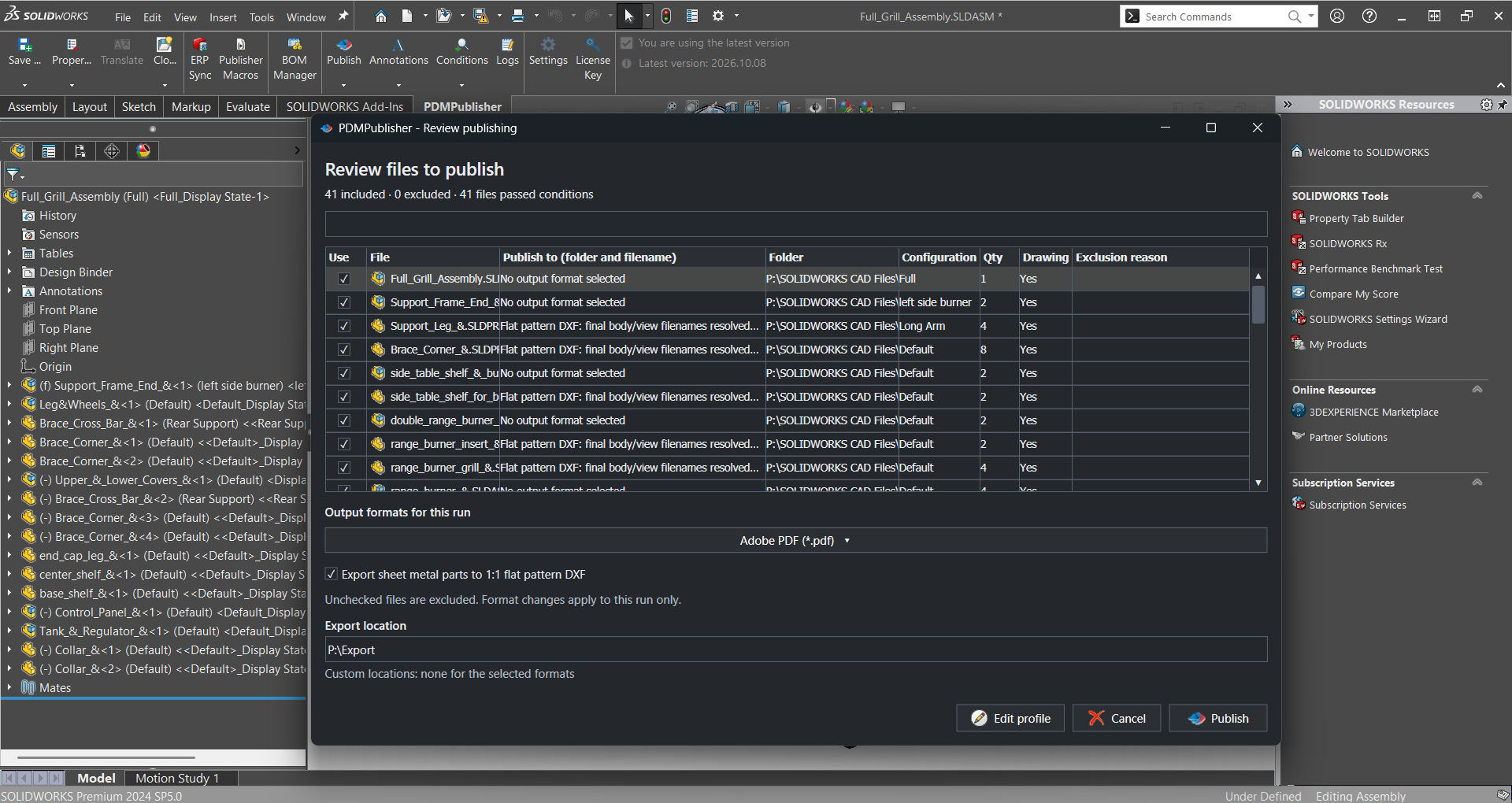
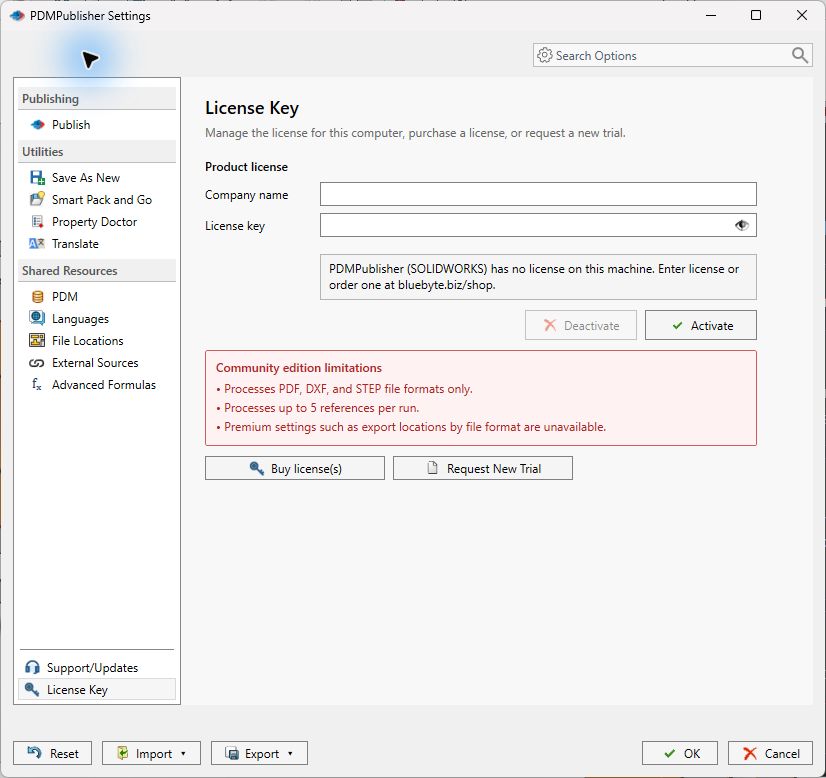
PDMPublisher for SOLIDWORKS publishes the open document and its references to 25+ formats with placeholder naming, sheet patterns, conditions, annotations and merged PDFs. The free Community Edition (PDF, DXF, STEP, 5 references per run) never expires; Premium is per computer. PDMPublisher for PDM Professional runs the same engine on workflow transitions, per vault, 7-day trial.
CUSTOMTOOLS (ATR Soft)
CUSTOMTOOLS is a suite: file naming, properties, drawing automation, batch print and convert across 25 formats with BOM-ordered printing, and a PDM Professional Task Add-in. Basic EUR 500 or Professional EUR 1,000 per unit plus EUR 250 per year; 30-day trial, no free edition. Best for teams that want naming enforcement, printing and ERP from one vendor.
CAD Booster Drew
Drew is a drawing-automation add-in: Blueprints store template and view preferences, batch creation makes drawings for an assembly or folder, and one-click export covers PDF, DXF and STEP. EUR 590 per year Solo or EUR 990 Business, 14-day trial. Its page does not mention PDM, scheduling, merging or watermarking; export is a by-product of drawing creation.
CADshift for SOLIDWORKS
CADshift targets fabrication output: laser-ready DXF, fabrication PDFs, a BOM Manager grid and weldment cut lists. A forever-free tier includes DXF and PDF export; Basic is USD 838 and Professional USD 949 per year. STEP, PDM and scheduled runs are not on the page we read. Best for sheet metal shops.
SOLIDWORKS Task Scheduler
Included with SOLIDWORKS; per the SOLIDWORKS Tech Blog the Export Files task offers DXF, DWG, IGES, PDF, STEP and JPEG for files or folders on a daily, weekly or monthly schedule. Scheduling exports needs a Professional or Premium seat. One format per task, whole documents, source filename, no PDM awareness.
SOLIDWORKS PDM Convert task
Free and already in the vault. GoEngineer’s guide shows it converting drawings to PDF on release; PDM Professional can also output STEP, IGES, Parasolid, DWG and Office documents. In PDM Standard most settings are locked. Neither edition documents merged PDFs, annotations, a table of contents or sheet-name filtering, which is why teams add a third-party task.
A DIY macro
CodeStack’s Export to multiple formats macro exports the active document to every path in OUT_NAME_TEMPLATES, with placeholders such as <_FileName_> and <_ConfName_> and an ALL_CONFIGS loop. Free, but you write the folder loop, error handling, logging and PDM check-in, and keep it working across versions.
Why teams pick PDMPublisher
Among the alternatives, PDMPublisher is the one built around the release package rather than the export call.
- Settings, not scripts: 25+ formats, placeholder naming and sheet patterns in one profile or task definition that the next administrator can read.
- Release-ready PDFs: watermarks and annotations with variable and SQL placeholders, merged master PDF with table of contents and bookmarks.
- Conditions: publish only references whose variables, state or filename match, so preliminary parts never reach the released folder.
- Configurations and sheets: per-configuration and per-sheet export, something Task Scheduler and the Convert task do not document.
- PDM Professional automation you can audit: workflow, right-click and Scheduled Items triggers, vault logs and a Task Details tab of every checked-in output; Word and Excel to PDF too.
- Free to start, ERP included: the Community Edition never expires, and ERP Sync (ERPNext, Odoo, Business Central, custom C#) and Publisher Macros ship in the add-in.
Bottom line
If you are leaving Batch+ to stop maintaining macros or to get PDM automation without the top edition, PDMPublisher is the recommendation: it documents the most publishing capability of any tool here and starts free. Stay with Batch+ for maintenance-style macro runs that need crash monitoring and a command line, and pair it with PDMPublisher for release output. For a one-off folder conversion on a Professional seat, Task Scheduler is already installed.
Try it
Run the first job of any tool, PDMPublisher included, on a copy or a test vault.
- Download the free PDMPublisher for SOLIDWORKS add-in (Community Edition, no license needed): bluebyte.biz download.
- Start the 7-day PDMPublisher for PDM Professional task trial and attach it to a release transition: bluebyte.biz/product/pdmpublisher-trial.
- Remove the Community limits with Premium: pdmpublisher.com/getpremium.
Availability
Available in PDMPublisher for SOLIDWORKS (the add-in) and PDMPublisher for PDM Professional (the task). PDMPublisher appears here as two products: the SOLIDWORKS add-in (free Community Edition or Premium) and the PDM Professional task (licensed per vault).
Documentation and related features
- Community vs Premium comparison (SOLIDWORKS add-in)
- File Formats option
- Run as a SOLIDWORKS PDM task
- Merge multiple drawings into one PDF
- Watermark your PDFs
- Sheet metal publishing
- Publisher Macros
- Batch SLDDRW to PDF
- SLDPRT to STEP
- PDMPublisher vs CAD+ Batch+
- PDMPublisher for SOLIDWORKS
Frequently asked questions
What is the best free alternative to Batch+ for SOLIDWORKS?
For release publishing, PDMPublisher’s Community Edition (PDF, DXF, STEP; 5 references per run, never expires). Task Scheduler is included with a Professional or Premium seat, the PDM Convert task is free inside PDM, and CADshift’s free tier covers DXF and PDF.
Which Batch+ alternative works with SOLIDWORKS PDM Professional?
The built-in Convert task, PDMPublisher for PDM Professional (licensed per vault, with workflow, right-click and scheduled triggers) and the CUSTOMTOOLS Task Add-in. Drew and CADshift do not mention PDM on the pages we read.
Do any of these alternatives monitor SOLIDWORKS for crashes like Batch+?
Not that their documentation states. PDMPublisher records Completed, Warning, Skipped, Error and Cancelled outcomes per file instead of restarting SOLIDWORKS.
Can I batch export SOLIDWORKS configurations and drawing sheets without a macro?
PDMPublisher converts multiple configurations with filters and selects drawing sheets by a name pattern in both the add-in and the PDM task. Task Scheduler and the Convert task export whole documents.