
Copying an assembly is never just copying files. Sub-assemblies need new names, references must point at the copies, Toolbox hardware should stay shared, the customer wants STEP and PDF beside the models, and PDM wants new part numbers. Pack and Go does part of that. Clone Tree does all of it from one grid and saves the plan as a profile.
In short
- One row per file: tick what to copy, give each row a new name and destination from properties, PDM values, serial numbers or formulas, select Copy.
- References are updated to the copies, Toolbox parts can stay where they are, companions such as STEP and PDF come along, and the result can be zipped.
- Validation runs before anything is written. Community Edition handles 5 rows per run; Premium has no limit.
How it works
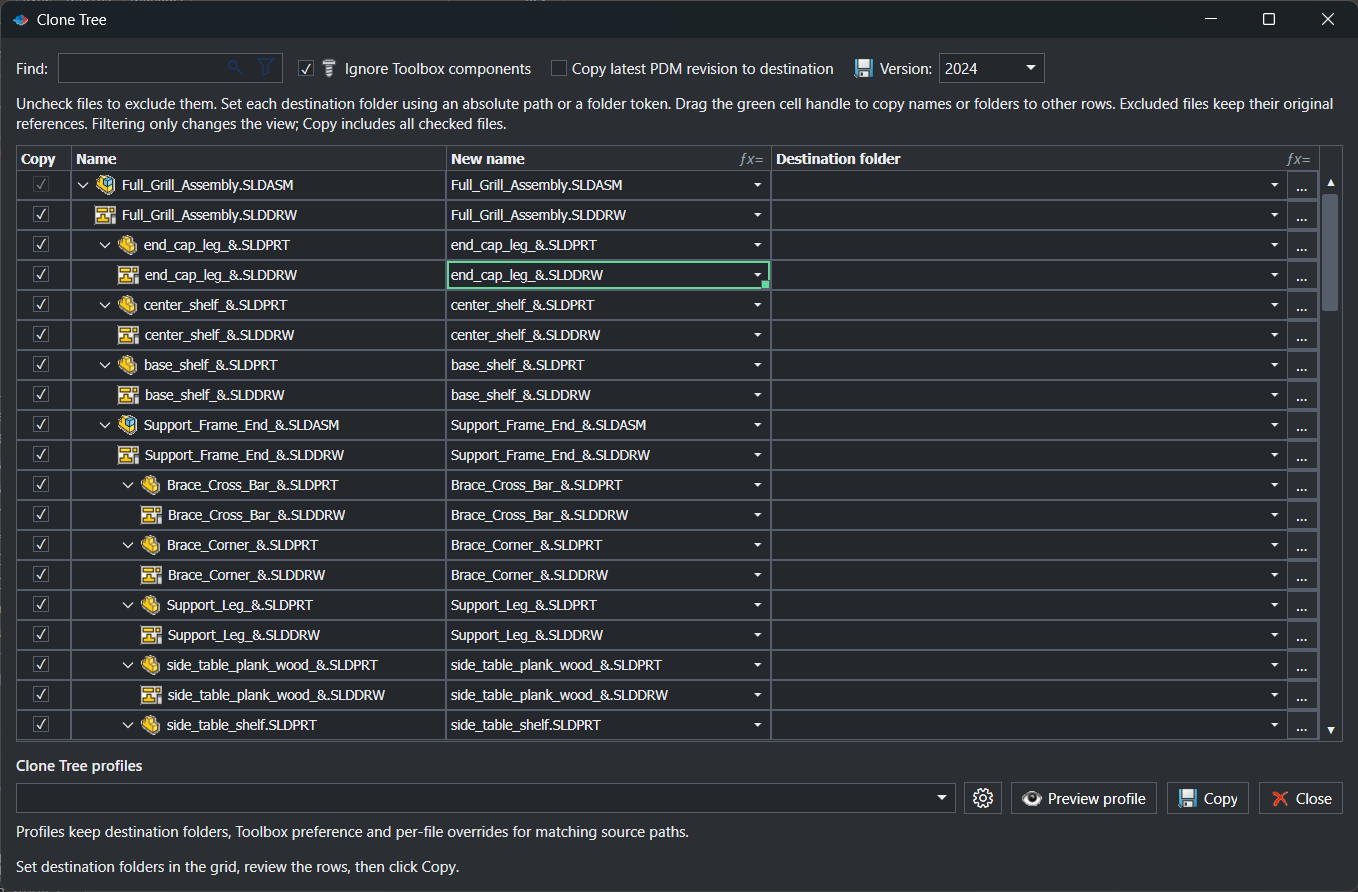
- Save the active document and select PDMPublisher > Clone Tree, or pick a saved profile from the arrow beside it.
- Tick the files to copy. Ignore Toolbox components removes hardware from the set in one click.
- Set New name and Destination per row from each cell’s menu, or drag the green handle to fill a pattern down.
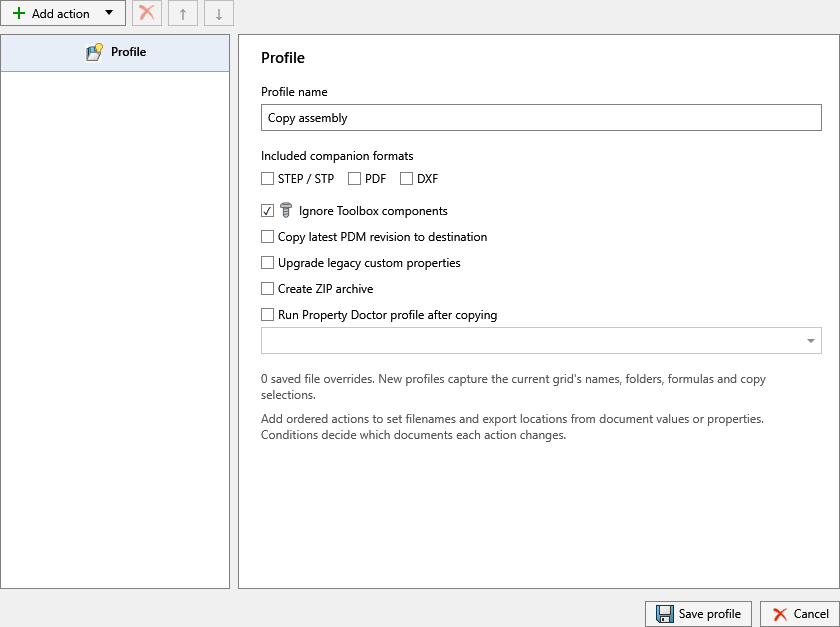
- Optionally enable Copy latest PDM revision, the companion formats, the SOLIDWORKS version to save in, and a ZIP archive row.
- Select Preview profile to see what a profile’s rules would fill in, then select Copy. Serial numbers are generated at this point and reused on a retry.
Settings that matter
| Setting | What to put | Why |
|---|---|---|
| New name | {Serial number} or {Original filename}-{Prompt user} | Every unique part gets a name that follows your scheme. |
| Destination | {Vault root folder}\Projects\{Prompt user} | The whole tree lands in one project folder. |
| Ignore Toolbox components | On | Hardware stays shared instead of being duplicated. |
| Companion formats | STEP, PDF | Existing exports with the same base name travel with the models. |
| Run Property Doctor profile after copying | A profile that resets project properties | The copies start clean. |
Recipes
| You want | Set | You get |
|---|---|---|
| A new customer machine from the standard design | Ignore Toolbox; New name {Serial number}; destination per project; Property Doctor profile after copying | New PDM numbers in the project folder, hardware shared, properties reset. |
| A supplier package of the released revision | Copy latest PDM revision; companions STEP and PDF; destination outside the vault; ZIP | One ZIP with released models, STEP and PDF. |
| A copy for a partner on an older release | Version = previous release; names unchanged; destination outside the vault; Toolbox included | A self-contained tree that opens in the partner’s SOLIDWORKS. |
If something looks wrong
- Validation stopped the copy: duplicate targets, an existing target, a changed extension or an unresolved destination. Fix the row named in the message and select Copy again.
- Companion files are missing from the package: only existing files with the same base name are included. Publish them first.
- Latest revision is unavailable: the file has no PDM revision, or no vault is selected on the PDM page.
- The Property Doctor step was skipped: the copied files must be compatible with the profile’s scope.
Availability
Clone Tree is part of PDMPublisher for SOLIDWORKS, the add-in that runs inside SOLIDWORKS. It is not part of the PDM Professional task. The Community Edition processes up to 5 rows per run; Premium has no row limit. Earlier builds listed the command as Smart Pack and Go.
Keep going
Documentation
Frequently asked questions
How is Clone Tree different from SOLIDWORKS Pack and Go?
Pack and Go copies files with a common prefix or suffix. Clone Tree gives each file its own computed name and destination from properties, PDM values, serial numbers and formulas, updates references to the copies, can reserve PDM numbers, include STEP/PDF/DXF companions, zip the result and run a Property Doctor profile afterwards.
Is Smart Pack and Go the same as Clone Tree?
Yes. Smart Pack and Go was the earlier label for the command in the Settings navigation; the current name is Clone Tree and the documentation page is the same.
Can Clone Tree assign new PDM part numbers?
Yes. Select the generator under Settings > Clone Tree > Use this serial number and insert the serial-number token in a row’s name or folder. One number is reserved per row and reused when both name and folder need it.
Does it keep Toolbox hardware shared?
Enable Ignore Toolbox components. Toolbox parts are left out of the copied set and the copied assemblies keep referencing the original Toolbox files.
Can I save the copy in an older SOLIDWORKS version?
In SOLIDWORKS 2024 and newer, the Version option saves in the current release or either of the two previous releases.
How many files can the free Community Edition copy?
Community processes up to 5 rows per run. Premium removes the limit.