
Review Condition Results Before Export
Enable Show conditions output dialog when you want to review assembly references after the condition tree is evaluated and before export begins.
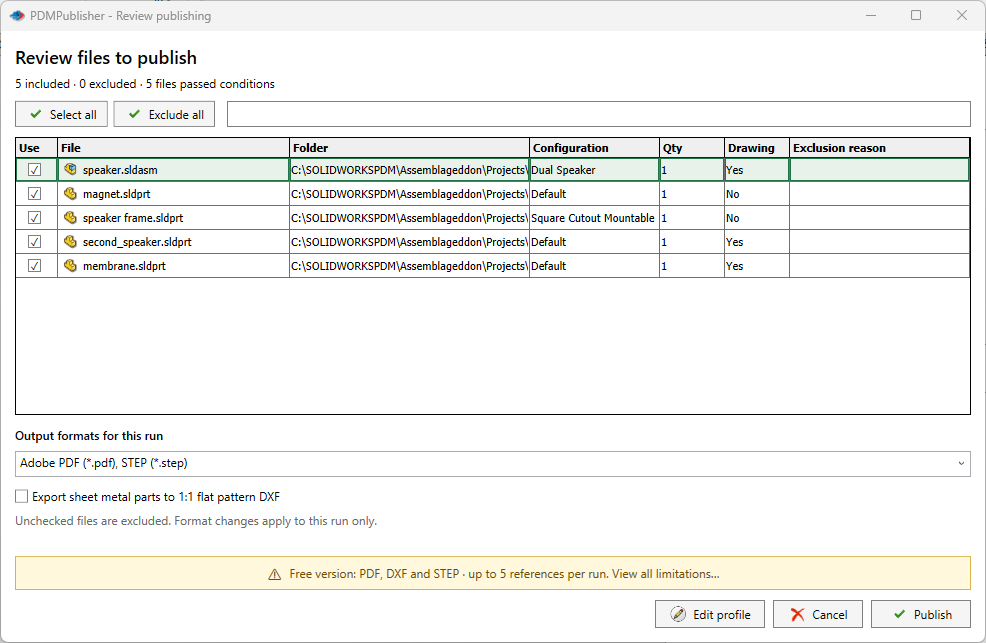
This option is enabled by default. It applies when the active document is an assembly, references are available, and Export references to file formats individually is enabled.
What the Dialog Shows
The dialog lists the files that passed condition processing, including available information such as:
- Filename and folder
- Referenced configuration
- Calculated quantity
- Whether a same-name drawing was found
- The exclusion reason for files that did not pass
The summary reports included files, excluded files, and the number that passed conditions.
| Control | What it does |
|---|---|
| Select all | Includes every listed file in this run. |
| Exclude all | Clears every Use check box. |
| Use | Includes or excludes an individual file without changing the saved condition tree. |
| Output formats for this run | Overrides the selected output formats for this run only. |
| Export sheet metal parts to 1:1 flat pattern DXF | Enables flat-pattern DXF output for this run. |
| Edit profile | Returns to the profile settings before publishing. |
| Cancel | Stops the review without starting the publish operation. |
| Publish | Starts processing the currently selected files and formats. |
The Community Edition banner reports its format and reference-count limits and links to the full limitations.
Files are selected by default. Clear a file when it should not be processed in this job, then confirm the dialog to continue.
Cancelling the dialog cancels the publish job before file processing begins.
If a job is cancelled after processing has already started, files completed before cancellation can remain in the output folder. See Publishing Workflow and Results.
Note
This dialog is a final job review. It does not rewrite the condition tree or permanently change the selected profile.
See Evaluation Rules for how references pass or fail the configured conditions.