
PDM Settings
Open PDMPublisher > Settings > PDM to select the local SOLIDWORKS PDM vault used by PDM-aware utility settings.
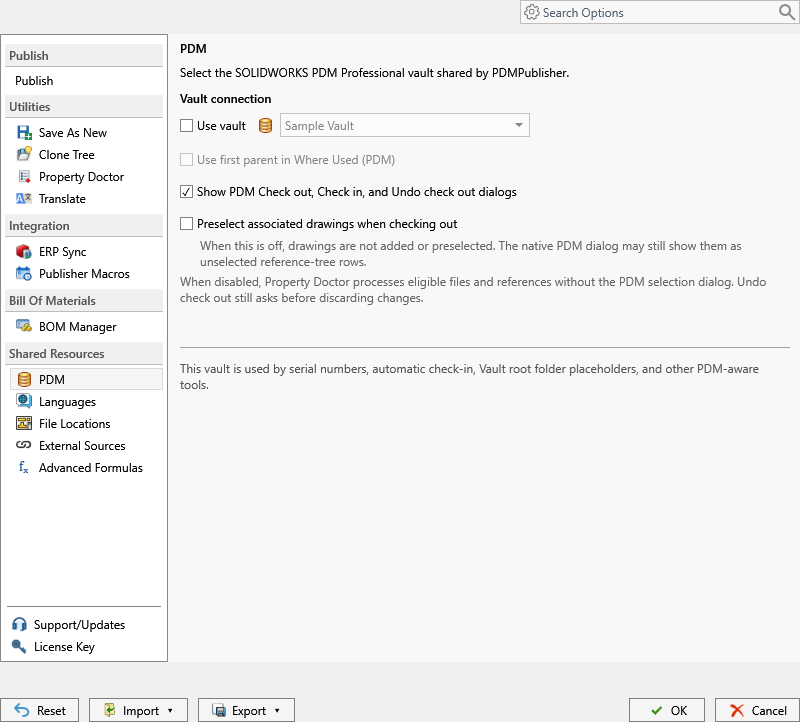
| Control | What it does |
|---|---|
| Use vault | Enables PDM-aware behavior for commands and profiles that support it. |
| Vault list | Selects the local SOLIDWORKS PDM Professional vault shared by PDMPublisher. |
Use this page when a Save As New or Clone Tree profile uses PDM serial numbers, revisions, check-in, or another vault-dependent operation. The selected vault must have a local vault view on the computer and the current Windows user must be able to log in to it.
Before Selecting a Vault
- Confirm that the required vault view exists locally.
- Log in through SOLIDWORKS PDM File Explorer at least once.
- Open Settings and select the vault on the PDM page.
- Enable Use vault and select the intended vault.
- Select OK to save the choice.
The selected vault is used for serial numbers, automatic check-in, Vault root folder placeholders, and other PDM-aware tools.
If no vault is available, create or repair the local vault view outside PDMPublisher. Publishing that uses only local SOLIDWORKS files does not require a vault selection.
Important
Selecting a vault does not move files, log the user in, or grant PDM permissions. It only identifies the vault that PDM-aware PDMPublisher controls should use.