
SQL Query Placeholders
Use an SQL query placeholder when annotation text must come from a SQL database. PDMPublisher replaces the file placeholder in the query, runs the query, and uses the returned value in the annotation.
In the SOLIDWORKS add-in, the placeholder is evaluated for the active document or reference currently being published.
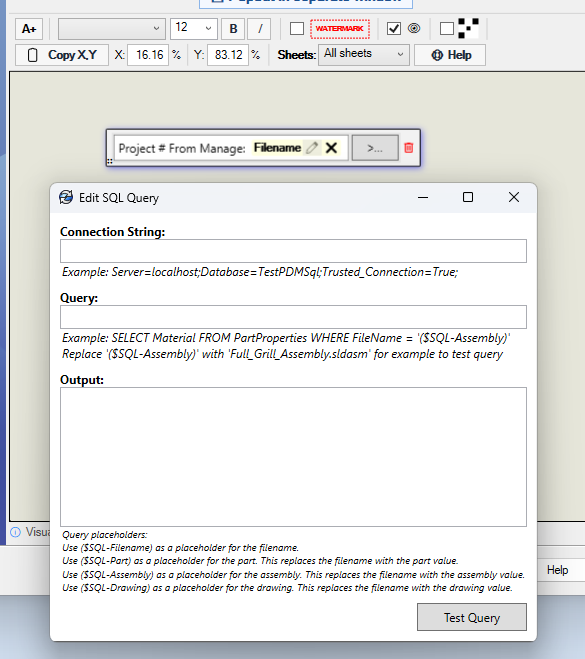
Configure the Query
- Add or select the annotation.
- Add an SQL value to the annotation, then select the pencil icon to open Edit SQL Query.
- Enter the SQL Server connection string.
- Enter a query that includes the placeholder for the file type you need.
- Select Test Query and confirm that the expected value appears under Output.
For example, a Windows-authenticated connection string can look like this:
Server=localhost;Database=TestPDMSql;Trusted_Connection=True;
Available Placeholders
| Placeholder | Value used in the query |
|---|---|
($SQL-Filename) |
The filename being processed. |
($SQL-Part) |
The filename changed to the .sldprt extension. |
($SQL-Assembly) |
The filename changed to the .sldasm extension. |
($SQL-Drawing) |
The filename changed to the .slddrw extension. |
Choose the placeholder that matches the record stored in your database. For example, use ($SQL-Assembly) when the database row is identified by the assembly filename, even when the annotation is being added to an exported drawing.
Filename Example
The following query looks up a project number by the current filename:
SELECT ProjectNumber
FROM FileProperties
WHERE FileName = '($SQL-Filename)'
If the filename is Bracket.sldprt, PDMPublisher evaluates the query as:
SELECT ProjectNumber
FROM FileProperties
WHERE FileName = 'Bracket.sldprt'
Assembly Example
The following query looks up material using the assembly filename:
SELECT Material
FROM PartProperties
WHERE FileName = '($SQL-Assembly)'
When testing this query in the dialog, replace the placeholder with an actual assembly filename because the test does not have the file context supplied by a publish job. For example:
SELECT Material
FROM PartProperties
WHERE FileName = 'Full_Grill_Assembly.sldasm'
The Output area shows the test result. Confirm that the query returns the text you want displayed in the annotation before saving the Publish profile.
Warning
Use a database account with only the permissions required to read the annotation data. If the connection string contains credentials, restrict access to exported SOLIDWORKS add-in profiles.