
Welcome
PDMPublisher automates publishing and export workflows for SOLIDWORKS and SOLIDWORKS PDM Professional. It can generate PDFs, DXFs, STEP files, release packages, and other deliverables using repeatable rules.

Choose your PDMPublisher version
PDMPublisher uses one code base and is available in two versions.
PDMPublisher for PDM Professional
The PDM task add-in runs inside SOLIDWORKS PDM Professional. Administrators configure centralized publishing tasks that users can launch manually, from workflow transitions, or on a schedule.
- Automate vault-based export workflows.
- Process individual files, assemblies, and their references.
- Control output paths, filenames, conditions, annotations, and merged PDF packages.
Open the PDMPublisher for PDM Professional documentation
PDMPublisher for SOLIDWORKS
The SOLIDWORKS add-in provides an interactive publishing workflow directly inside the SOLIDWORKS desktop application. It can also be used without SOLIDWORKS PDM Professional.
PDMPublisher for SOLIDWORKS is registered as a SOLIDWORKS Partner Solution add-in and appears under Partner Solution Add-Ins in the SOLIDWORKS Add-Ins dialog.
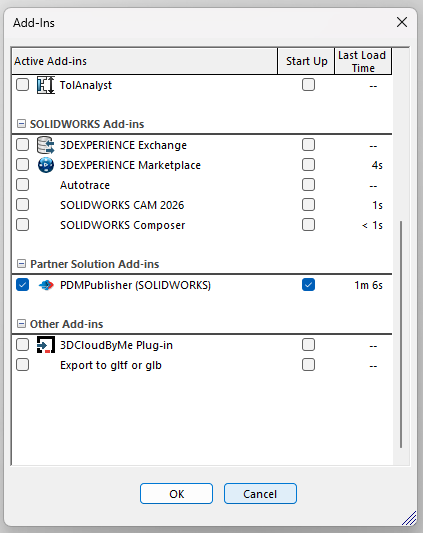
- Export directly from SOLIDWORKS.
- Configure options, annotations, conditions, and destinations interactively.
- Publish files to PDM, file servers, or other configured locations.
Open the PDMPublisher for SOLIDWORKS documentation
Supported formats
PDMPublisher supports PDF, 3D PDF, DWG, DXF, STEP, IGES, Parasolid, STL, eDrawings, HTML, image formats, and other CAD interchange formats. See File Formats for the complete list and source-file behavior.
Getting started
- Watch the PDMPublisher video demos.
- Request a 7-day trial.
- Install or update PDMPublisher with PDMDeploy.
- Set up your first PDM task.
Getting support
Contact Blue Byte Systems or email support@bluebytesystemsinc.zohodesk.com. Include the task log, relevant screenshots, and a description of the issue.